 Posted by
 You can join your Roblox friends on a private server where not just any user can enter. So, how to join a private server in Roblox? This post will cover everything you need to know about it. Private servers aren’t always available in every experience on Roblox.
You can only access experiences that have specific settings enabled. To join a private server, go to the Server page and select the specific private server option. Server owners can also share a link so users can join quickly. Sometimes servers don’t appear, this may be due to incorrect settings (permissions/privacy).
Privacy settings or age-related restrictions can affect user access. Be sure to check access permissions before sharing an invitation with other users.
What Is a Private Server in Roblox?
This is a server with restricted access; the owner can control who can join based on the available server settings. You can check whether an experience has a private server or not. Yes, not all experiences you find on Roblox offer this feature.
The owner must enable the private server feature so that other users can access the server. Other users can then select the relevant server from the Servers menu if they have permission to join. Use this feature if you want more control over who can access the server.
Owners can configure access restrictions as needed to control who can access the server. Users can access a private server through the “Servers” section in a Roblox experience or via a link. Owners can invite you via a shared link for more efficient access, simply follow the on-screen instructions.
What You Need to Join a Roblox Private Server
Want to know how to join a private server in Roblox? You should know first that not all private servers on Roblox are open to everyone. If the owner has set certain restrictions, other users must get permission first to join. At a minimum, users need the following to join a private server:
- Access to the experience
- An experience that supports private servers
- Permission to join the private server
- A link or invitation if the owner uses one to share access
How to Join a Private Server in Roblox
You can join a Roblox private server in an experience with private servers enabled. The server owner can enable this feature so that other users can select the private server option in the Servers section. The Servers menu is available in Roblox for both the website and the app.
Join Through the Experience’s Server Section
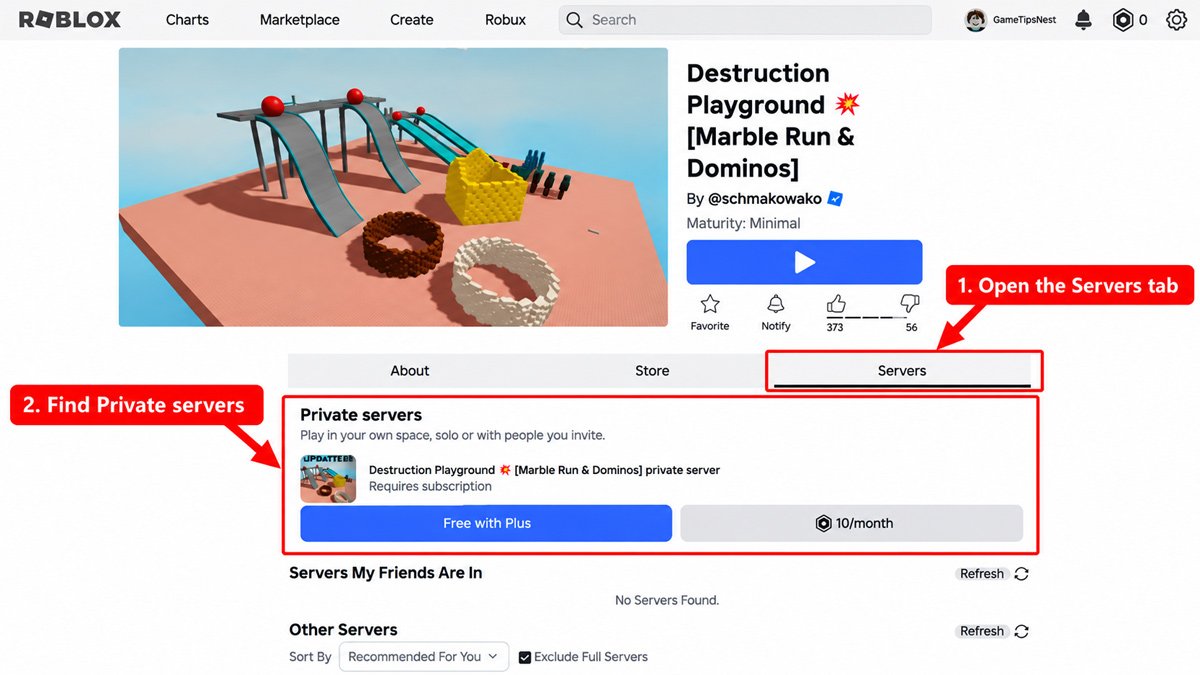
So, how to join a private server in Roblox? You can follow the step-by-step guide below:
- Open Roblox and Sign In: Use an account that can access the private server based on its age and privacy settings.
- Find the Roblox Experience: Search for the experience you want to play with friends on a private server.
- Open the Experience Page: Tap on the experience to go to its main page
- Scroll to the Servers: Look for the section within the experience that displays Servers.
- Look for the relevant Private Servers section: You’ll only see this feature if the creator has enabled it.
- Select the Private Server Option: Select the private server you have permission to join.
How to Join a Roblox Private Server with a Link
You can use a Roblox private server link only when the owner shares the relevant link with you. This is an efficient way to access an experience on a specific private server quickly. Follow these steps to do so:
- Ask the server owner for the private server link
- Sign in with the correct account (make sure you’re not restricted from accessing the private server)
- Open the server link
- Follow the prompts or steps provided by Roblox to access the experience/server.
- Check whether your account has permission to join if Roblox does not allow access.
How to Join a Private Server on Mobile
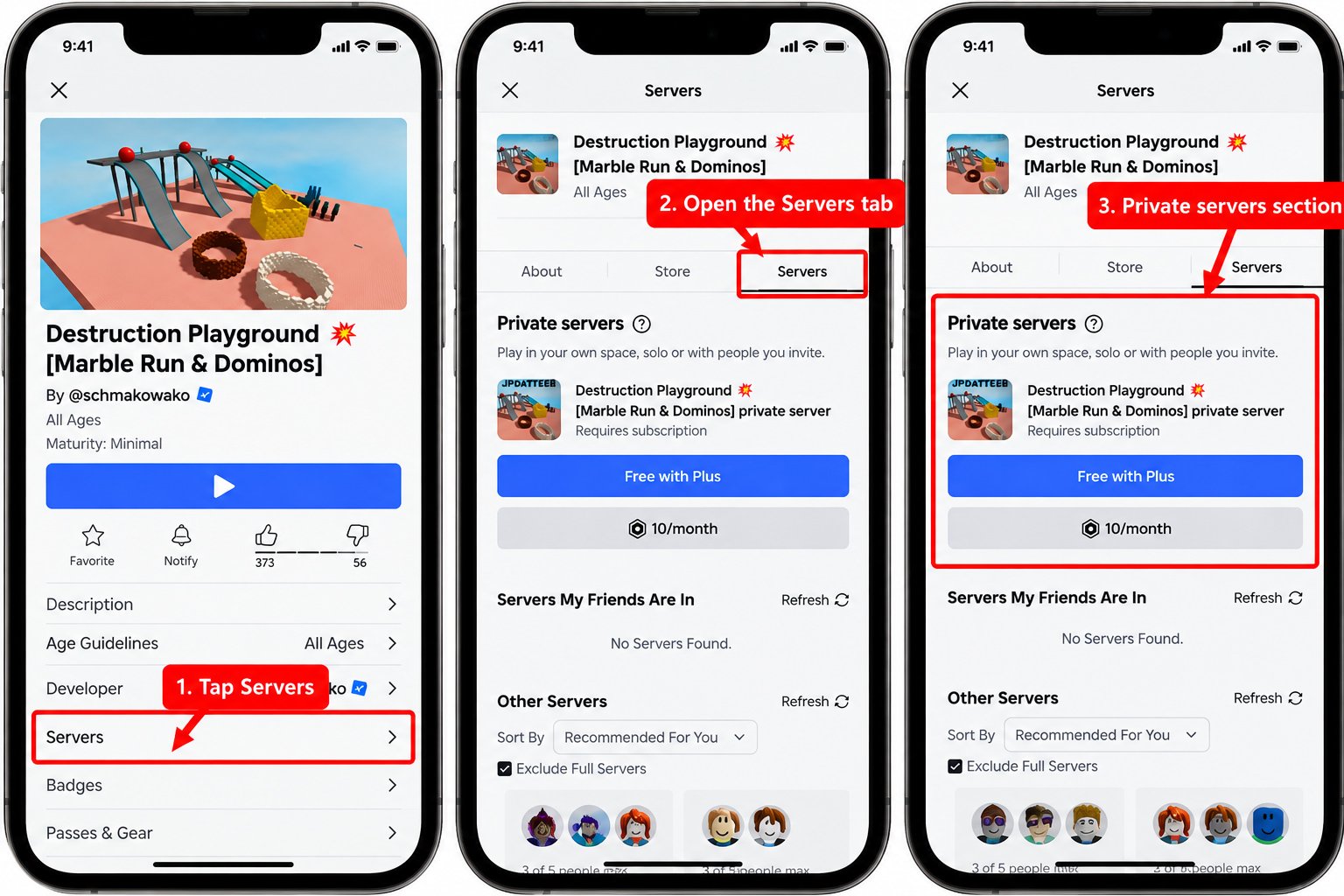
Whether you’re using a desktop or a mobile device, you can still access the experience via a private server. Want to join a Roblox private server using a mobile device? It’s easy, even for new players. Follow the simple guide below for mobile users to join a Roblox private server:
- Open the Roblox app on your mobile device
- Sign in with the correct account and open the experience
- Navigate to the Servers section (check if the private server is active)
- If the experience has private servers enabled, look for the Private Servers section and select a server you have permission to join.
In addition to the steps above, you can also use a shared link to access a private server on your mobile device. Once you’ve selected a specific server, follow the on-screen instructions.
Can You Join a Roblox Private Server Without an Invite?
An invitation is not always required. Whether you can join depends on the private server’s access settings and whether your account is allowed to join. However, the owner may restrict access so that users need an invitation or permission to access the server.
Roblox allows server owners to control which users can play or to restrict access to their friend list. Therefore, only users who meet the server’s access settings can join.
Why Can’t I Join a Private Server on Roblox?
Joining a specific server on Roblox isn’t always smooth, sometimes Roblox private servers don’t work, and you need to know how to fix that. The cause could be related to your experience; perhaps access to the private server feature hasn’t been enabled yet, even though the owner must activate it first.
Your Roblox account may also be restricted due to certain privacy settings or other factors. Here are some conditions that might make it difficult for you to join a Roblox private server:
The Experience Doesn’t Support Servers
Not all experiences support private servers; some may not have the feature enabled. As long as the private server feature isn’t enabled, you won’t be able to create or join a private server in that experience.
You Don’t Have Permission
Your account may be unable to access a private server due to system restrictions. The owner can limit which users are allowed to join. Contact the owner to request permission to join.
Your Privacy Settings Are Blocking Access
Privacy and access settings can affect a user’s access to private servers. Check your privacy settings to see if your account has any access restrictions.
Age-Related Restrictions Apply
Roblox enforces age restrictions within its system, which can affect access to private servers. By default, users under 13 can only join private servers owned by their friends. Roblox’s privacy settings may also apply additional restrictions, so you’ll need to review the settings available on your account.
The Server Link Is Invalid or No Longer Works
Invitation links don’t always work. Using an invite link is indeed efficient, especially for new players or those who are trying to join a private server for the first time. However, there are times when this is not an option, so you will need to try the usual method through the experience page.
You might not be able to join via a link because the server configuration or access settings have been changed. Ask the owner if the link still uses the same configuration.
The Server or Experience Is Temporarily Unavailable
Another possible cause is an issue with the experience’s server or the main Roblox server. If the server or experience is temporarily unavailable, wait and try again later. You can also check whether other Roblox experiences are working normally.
Roblox Error 524
If you encounter Error 524, it means you do not have permission to join the game. For private servers, check your private server settings, account permissions, and whether the server owner has allowed your account to join.
How to Fix Roblox Private Server Error 524
The first things to check when you encounter Error 524 are your server permissions and privacy settings. In addition to knowing how to join a private server in Roblox, you should also know how to troubleshoot issues, including when you encounter errors like this one. Follow the tips below to resolve this issue:
- Check the private server permissions on your account
- Ask the private server owner to grant your account access
- Check your privacy settings as well
- Make sure the relevant server is still available
- Restart the Roblox app
- Make sure your internet connection is fast and stable
- Try joining the private server again
How to Check Roblox Private Server Privacy Settings
One of the settings that affects access to private servers is Roblox’s privacy settings. If other users can access the server but you cannot, you should double-check the privacy settings in your Roblox app. You can follow these steps to check them:
Settings > Privacy & Content Restrictions > Visibility & Private Servers
Not all accounts have the same settings options. Available settings and options can vary by account and age. In the privacy settings, you can control who can see when you’re online and your current experience.
Frequently Asked Questions
How do I join a private server in Roblox?
Navigate to the Roblox experience you want to access and go to the Servers section. Check whether Private Servers are available; select a specific server (make sure you have permission to access it). You can also join a private server via a link shared by the owner.
Why can’t I join a private server on Roblox?
Under certain conditions, you may not be able to join a Roblox private server. These include lack of permissions, privacy restrictions, age-related restrictions, the server being unavailable, or the experience not supporting private servers.
Can anyone join a Roblox private server?
Not everyone can join a private server on Roblox. Access depends on the server’s configuration and the user’s permissions. The owner can change the settings so that only specific users can access the server.
Do I need Robux to join a private server?
Joining a private server doesn’t always require you to purchase Robux first. Purchasing or subscribing to a private server is different from joining an existing server. The cost of accessing a private server depends on how the experience creator sets it up.
Can I join a private server on mobile?
Yes, you can join a private server when accessing the Roblox app on a mobile device. However, make sure the server and your account permissions allow it, and that the private server feature is enabled in the relevant Roblox mobile experience.
Why can’t I see the Private Servers section?
When you open the Servers section, you might not see Private Servers. This could be because the private server hasn’t been enabled by the creator, due to UI or account differences, server availability, or applicable account restrictions.
Can I join a private server without being friends with the owner?
Whether or not you can join a private server on Roblox without being friends depends on the server’s configuration and the latest Roblox access rules. By default, users under 13 can only join private servers owned by their friends. These access rules can also depend on your account’s age and privacy settings.
Final Takeaway
How to join a private server in Roblox? You can start by opening the Roblox experience you want to play. Open the Servers section on the experience page and check whether Private Servers are available. If they are, look for a private server you have permission to join.
Another way is to use a valid private server link provided by the server owner. If you can’t access the server, check the “Privacy Settings” and “Permissions” sections. Keep in mind that not all experiences on Roblox support private servers. You might not see any private servers when you go to the “Servers” section.
The owner may not have enabled the private server feature, so you won’t be able to find or access it even if you’ve adjusted your privacy settings. So, that’s all about how to join a private server in Roblox.