 Posted by
 Playing Roblox isn’t always fun, sometimes someone might bother you by spamming you with messages. There are also players who intentionally disrupt you while you’re playing on Roblox. The solution is to block them. So, how to block someone on Roblox?
This post will provide you with a complete guide to blocking users on Roblox. Once you block them, the blocked user will no longer be able to interact with you in the same way. This method is worth considering if you don’t want to interact with a specific account or want to stop communicating with them.
The process is quite simple and can be done through the profile feature. In this post, you’ll learn how to block someone, what happens as a result, how it differs from reporting, and some useful troubleshooting tips.
What Happens When You Block Someone on Roblox?
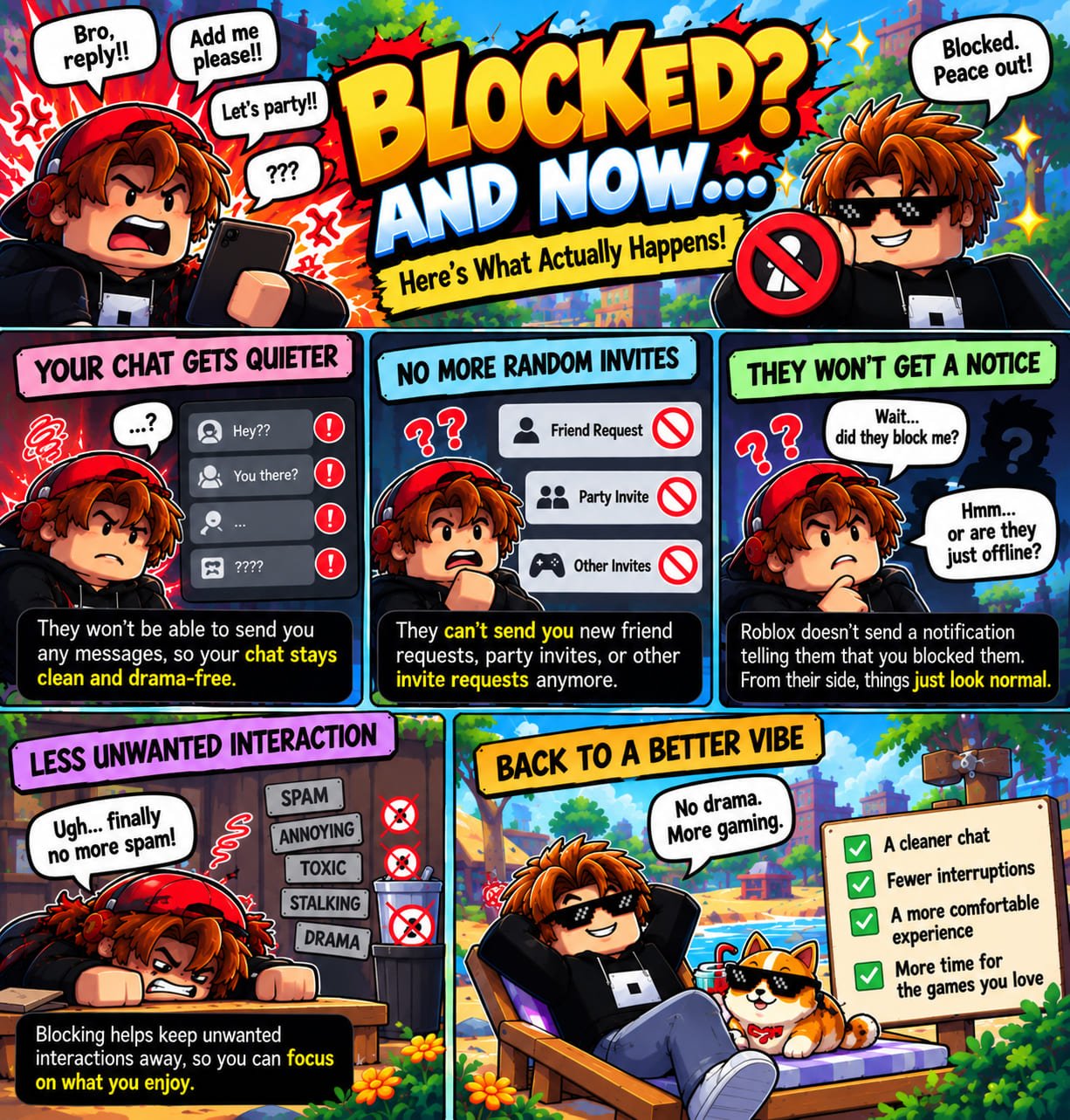
If you block someone on Roblox, your interactions with them will be restricted. The person you block will no longer be able to interact with you as they did before. Features such as party invites, friend requests, and sending messages will no longer be available.
What happens when you block someone on Roblox? Your account will also automatically be unfriended from the blocked account if you were previously friends. The block feature on Roblox is designed to limit interactions with accounts that disrupt your activities. However, the exact behavior may depend on the specific Roblox feature involved.
Depending on the experience you’re playing, blocking may affect things differently. The latest Roblox updates may also change these effects. Essentially, the Roblox blocking feature can limit interactions between users.
How to Block Someone on Roblox
Blocking a user on Roblox is just as easy as on other platforms. You can do this when accessing Roblox through the app or the website. Want Roblox block someone? You can follow the steps below:
Step 1: Find the Person You Want to Block
How to block someone on Roblox? First, you need to know the Roblox username of the person who is bothering you or with whom you don’t want to interact. Find the username in your chat history, friend/follower list, or search for it manually. Usernames on Roblox are often similar, so you’ll need to double-check the name. Don’t forget to look at their avatar as well to make sure it’s the right person.
Step 2: Open Their Roblox Profile
Every profile on Roblox has a dedicated block menu. Once you’re sure of the username and avatar, you can tap on their profile to go to the main profile page.
Step 3: Open the User Options
On the profile page, select the three dots in the upper-right corner of the profile details section to open the available options.
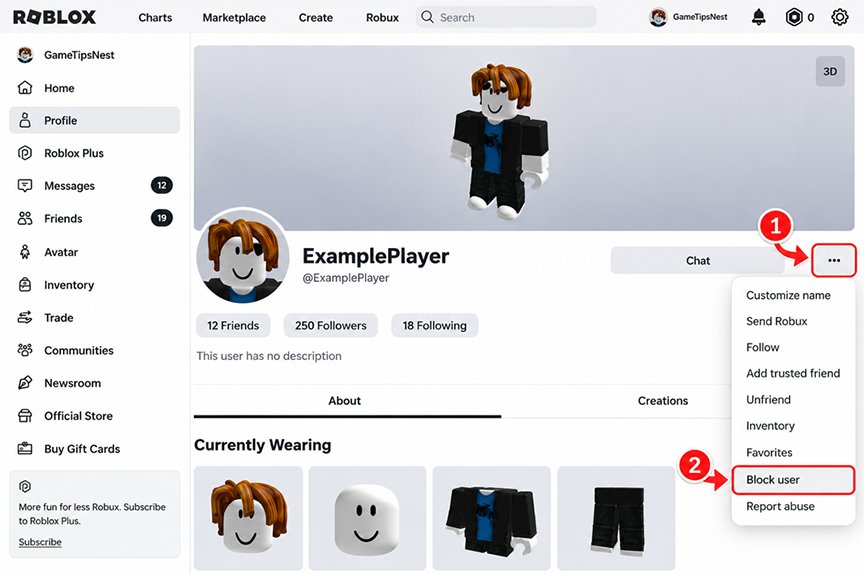
Step 4: Select Block
Select the Block User option from the menu to block the player.
Step 5: Confirm the Action
If Roblox asks you to confirm the action, follow the instructions shown on your screen. Once the process is complete, the user will be blocked.
Adjust the instructions above to match the buttons and menu names on your screen. The interface may differ between mobile devices and the website. The Roblox UI may also change with future updates.
How to Block Someone on Roblox While Playing
You might need to block someone while you’re in a game on Roblox. So, how to block someone on Roblox? Roblox lets you maintain a comfortable experience with its in-game block feature. Yes, you don’t have to leave the experience to block a specific player on Roblox.
To do this, open the player/user list through the in-experience menu when it is available. Search the list for the username you want to block and select that name to open the user’s options. So, how to block a player on Roblox?
Look for the button or option to “Block User.” It’s best to follow the on-screen instructions for this method. Depending on Roblox UI updates, menu details may vary in name or appearance. The key is to access the profile of the user you want to block.
On the user’s profile page, you’ll find various options, including the option to block that user.
How to Block Someone on Roblox Mobile
Do you use a mobile device to play Roblox? You can block users on Roblox mobile, and the process is very simple. Many players tend to use their smartphones or mobile devices to enjoy the Roblox experience.
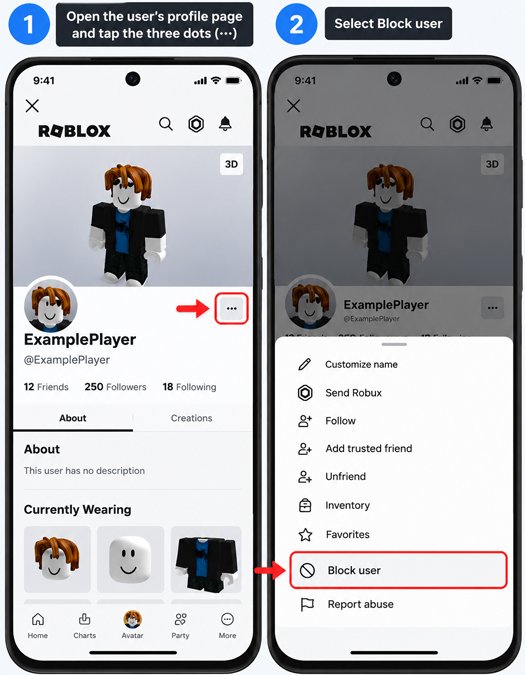
So, how to block a player on Roblox mobile? First, you need to know the Roblox username of the user you want to block. Visit their profile page and look for the instructions to block the user. Follow the instructions provided by the Roblox system.
Blocking a player on Roblox Mobile is similar to doing it on a desktop. The main difference lies in how you navigate within the Roblox interface. There are some differences in the interface that affect how you navigate the app versus the website.
If you already understand how to block someone on Roblox while playing on the website, it’ll be easy to do the same in the Roblox app.
Can You Block Someone on Roblox Without Unfriending Them?
Blocking someone on Roblox will affect your friend status with that user. If you block a user on Roblox and they are your friend, you will no longer be friends or followers. You won’t be able to invite each other to parties, send messages, or even send friend requests.
So, you can’t block someone on Roblox without unfriending them. Roblox’s block feature is designed to limit interactions between players. Therefore, think carefully before blocking someone on Roblox.
Do you still need to interact with them in the future or not? So, do they know that you’ve blocked them right away? No, there’s no notification sent to users who’ve been blocked by others.
Block vs. Report on Roblox: What’s the Difference?
Blocking and reporting are two things that some players may often misunderstand and misuse. Their functions are different: one is for reporting a community violation, while the other is more about limiting interaction with other users.
Swipe left to see more →
| Aspect | Block | Report |
|---|---|---|
| Goal | To limit your interactions on Roblox with specific players/users | To report a user’s activity, violations, or behavior to the Roblox system |
| Main focus | Focus on how users can control their personal interactions with other users | Focus on alleged violations on Roblox |
| User Guide | Different context and function from the disciplinary report on Roblox | Use this when there is a violation of the Community Standards |
From the table above, we can see the appropriate uses for Block and Report. They serve different purposes; understand your intent, whether you want to limit interaction with the user in question or report specific negative actions to Roblox. If you simply don’t want to interact with a certain user anymore, consider just blocking them.
However, if you believe someone is violating Roblox rules, you can report the relevant behavior to Roblox. You can do both if that’s your goal. But you must learn both well enough: how to block someone on Roblox and report them. So, blocking and reporting are two different things, in terms of their purpose, focus, and use on Roblox.
Why Can’t I Block Someone on Roblox?
There are times when you can’t block a user properly on Roblox. Here are some reasons why you might not be able to block someone on Roblox website smoothly:
1. The Roblox Interface Has Changed
Roblox updates, especially major ones, can change how to block someone on Roblox. The location of menus or buttons may have changed, and you may need to take one extra step beyond what’s outlined in the tutorial above.
This doesn’t mean that menus or buttons have disappeared; they may simply be located in different places. Understand the similarities in names and menus, then adjust accordingly based on what you see on your screen.
2. You’re Looking in the Wrong Place
You’ll need at least the username of the person you want to block so you can find them easily. If you’ve chatted with them before, you’ll know their username and can access their profile from your chat history. If you’re currently in a game or experience, go to the leaderboard or player list to find the user you’re looking for.
Select the appropriate option on the profile page, such as the “More” menu or the three-dot icon. There, you’ll find the Roblox block button. Just tap or click that button after visiting the correct profile.
3. Temporary App or Website Issue
The problem could also stem from the website or app server. Bugs can occur unexpectedly, and you need to know how to handle them. One solution is to refresh the web page or the Roblox app. If you’re using the Roblox app, you can restart it.
Also check your app version. If it has been a while since the app was updated, updating it may help resolve temporary issues.
Another method is to sign out and sign back in. If the methods above don’t work at all, the problem might be something else.
4. The Feature Behaves Differently on a Specific Roblox Platform
The interface may vary across devices, platforms, and features. You might encounter issues with the app, while the website works just fine. Roblox features are very diverse, and it’s possible that only one feature is experiencing an error while others are working normally.
You can close the Roblox app and then reopen it. If you’re using the website, close the tab or window, then go back to the Roblox page. Also check whether the issue is caused by a device-related factor. Try switching between devices to see if the behavior changes.
Can You Block Someone Who Isn’t Your Friend on Roblox?
It’s not just for friends, you can also block someone who isn’t your friend on Roblox. Any player can visit another player’s profile as long as they haven’t been blocked. Just like blocking a friend on Roblox, you can select the “Block” feature from the menu on the relevant user’s profile.
Reasons for doing this might include someone spamming you with messages, making fun of you, or doing other things that make you uncomfortable. So, this Roblox feature isn’t limited to friends, it also applies to people who aren’t your friends yet.
Frequently Asked Questions
What happens when you block someone on Roblox?
If you’re friends, the blocked user is no longer your friend or follower. They can’t send messages, invitations, or friend requests once you’ve blocked them.
Can someone tell if you blocked them on Roblox?
No notification is sent to users who have been blocked by another user. They’ll only know that they’re no longer friends and can’t send messages or interact in any other way.
Can you block someone on the Roblox mobile app?
Most Roblox features on the website are the same as in the app, including the block feature. You can visit the profile of the user you want to block; look for the menu and the specific button to block the player.
Can you block someone who isn’t your friend on Roblox?
You can still block a Roblox player even if you aren’t friends with them. As long as Roblox’s blocking system remains the same, you can block a user through their profile page.
Is blocking the same as reporting someone on Roblox?
Blocking and reporting are two different things; blocking limits interaction, while reporting sends information about a potential violation to Roblox. You can do both if necessary.
Can you unblock someone later?
Yes, you can unblock someone on Roblox from your account settings. Go to Settings, select Privacy & content maturity, open Blocked users, and select Unblock next to the user you want to unblock.