
 Posted by
 Online gaming safety becomes more important when a familiar gaming interaction starts to feel uncomfortable. Imagine meeting a teammate who helps you win matches, shares useful tips, and makes every session more enjoyable.
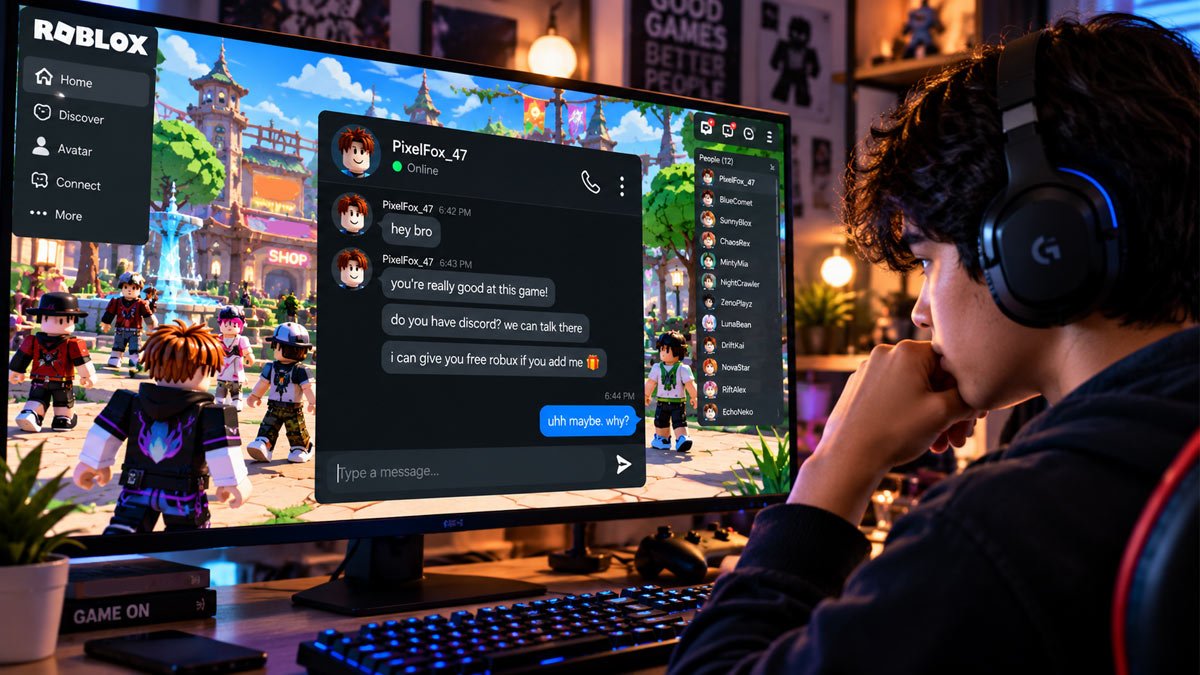
After playing together for a while, they ask for your phone number, personal photos, or a private conversation on another app. The request might seem harmless at first, but something feels different.
Risky conversations do not always begin with obvious warning signs. This article explains how to recognize social pressure, identify unsafe chats, and respond when someone begins crossing personal boundaries.
What Healthy Gaming Interactions Should Look Like
Healthy gaming interactions allow players to enjoy teamwork without feeling obligated to share more than they want. Teammates may discuss strategies, celebrate wins, joke around, or invite each other to play again. They respect a refusal, avoid demanding personal information, and let others leave a match or end a conversation without threats or embarrassment.
Moving a conversation to another app is not automatically dangerous. The context and the person’s response to boundaries matter.
For example, inviting a teammate to join a group chat for scheduling matches can be reasonable. Insisting they move to a private app and keep the conversation secret is more concerning, especially when the person ignores a clear refusal.
Red Flags That Deserve Attention
Online gaming red flags you need to be aware of:
1. Pressure to Move to Another App
Moving to another platform is not automatically suspicious. However, repeated requests after someone declines deserve attention.
For example, a teammate insists on switching to a private messaging app and refuses to explain why. Pressure to avoid platform moderation or reporting tools makes the request more concerning.
2. Requests for Personal Information
Be cautious when someone asks for your full name, home address, school, phone number, live location, or daily routine. Never share passwords or verification codes. A public gaming username is different from information that could reveal your identity, location, or account access.
3. Secrecy, Guilt, and Emotional Pressure
Statements like “Keep our conversations between us” or “If you really trusted me, you would do this” can be used to pressure someone into keeping secrets or agreeing to something they do not want to do.
A healthy gaming friendship should never involve keeping chats secret from trusted adults or sharing personal details to prove trust or loyalty.
4. Repeated Boundary Violations
Pay attention when someone keeps requesting photos, sends messages after being asked to stop, or pressures you to do something uncomfortable.
One awkward message does not necessarily reveal someone’s intentions. Look at the broader pattern: Do they respect your choices, or do their requests become more personal and persistent? How someone responds to a clear boundary often matters more than how friendly they seemed at first.
What to Do When Someone Crosses a Boundary
When an online interaction becomes uncomfortable, online gaming safety starts with taking control of what you share and how you respond. The following online gaming safety tips will protect your privacy:
Step 1: Stop Sharing Information
Do not send personal details, photos, money, passwords, verification codes, or private content to preserve a friendship. The principle of saying no without needing to provide an explanation to anyone.
Step 2: Set a Clear Boundary
A short response is enough:
-
- “I’m not comfortable sharing that.”
- “Let’s keep our conversations in the game.”
If the person keeps arguing or applying pressure, you do not have to continue the discussion.
Step 3: Block or Mute When Needed
Mute can help when someone repeatedly interrupts or sends unwanted messages. Blocking is useful when you want to stop further contact. You do not need to block everyone after an awkward conversation, but persistent pressure or harassment is a reasonable reason to do so.
If you play Roblox, our guide explains how to block someone on Roblox.
Step 4: Report the Behavior
Use the platform’s official reporting feature for harassment, threats, exploitation, inappropriate sexual requests, or other rule violations. Choose the category that best matches what actually happened. Reporting helps the platform review the behavior, although the outcome is not guaranteed.
Step 5: Save Evidence and Ask for Help
If the situation involves serious threats or exploitation, save relevant messages, usernames, or screenshots when safe and permitted. Avoid sharing that evidence publicly. Never retaliate, expose someone’s personal information, or investigate their identity yourself.
Children should know they can tell a parent or trusted adult what happened without automatically being blamed or losing all gaming privileges. Getting help early can make it easier to decide what to do next.
A Practical Guide for Parents
Helping children develop online gaming safety habits starts with conversations they feel comfortable having, not simply limiting screen time.
Ask about situations, not just screen time. Try open-ended questions such as “Has anyone in a game ever made you uncomfortable?” or “What would you do if another player asked you to keep a chat secret?” You can also ask, “Do you know how to block and report someone?”
Review safety settings together. Check who can message your child, invite them to games, or view their profile.
Make asking for help feel safe. If a child shares an uncomfortable experience, listen calmly before deciding what to do next. Avoid shaming them for replying to a message or trusting another player.
For additional advice, parents can explore the FTC’s guide to kids and video games for practical information about children’s privacy, in-game communication, and handling unwanted contact with other players.
Quick Safety Checklist
Before continuing an online interaction, ask yourself:
-
- Am I being pressured to share private information?
- Is there someone asking for a private conversation?
- Do they respect it when I say no?
- Am I being pushed to move to a more private platform?
- Do I know how to mute, block, and report this person?
- Is there a trusted adult I can talk to if something feels wrong?
If any answer concerns you, pause before responding.
Conclusion
Online gaming can create positive friendships and enjoyable shared experiences. Practicing online gaming safety means recognizing that every player deserves privacy, respect, and the freedom to say no.
Use available safety features to manage unwanted contact, and ask a trusted adult for help when pressure or threats continue. Setting boundaries is a reasonable part of enjoying games responsibly.