 Posted by
 Roblox User ID is a unique number tied to your Roblox account. It is different from a username or display name. This numeric User ID stays associated with your account and can be used to identify your profile.
If you need to find Roblox User ID for your own account or another Roblox profile, you can usually locate it through the profile page and its URL.
The quickest method is to open the Roblox profile you want to identify and check the profile URL in your browser. The URL contains a series of numbers that represents the account’s User ID.
Once you know where to look, finding a user ID number only takes a few seconds. This guide explains where to find Roblox User ID, how to recognize it, and what to do if the number is not immediately visible.
What Is a Roblox User ID?
A Roblox User ID is a unique numeric identifier assigned to a Roblox account. Each account has its own User ID, which helps Roblox distinguish one user from another.
Unlike a username or Display Name, the User ID is a numeric identifier associated with the account.
A User ID consists of numbers. For example, 123456789 is a fictitious User ID. It is not a password, login code, or other credential; it is an identifier associated with the account.
Roblox also uses User IDs as unique identifiers in its developer documentation. You can learn more about how Roblox handles user IDs in the Roblox Creator Hub documentation.
It is important to understand the difference between a User ID and the names shown on a Roblox profile. A username is the unique account name used to identify the account on Roblox, while a Display Name is the name shown to other users and may not uniquely identify the account.
For example, a profile could have a username such as AlexIron and a Display Name such as Alex, while its Roblox User ID could be 123456789.
These are three different pieces of information. The User ID is the numeric account identifier.
Roblox User ID vs. Username vs. Display Name
When trying to find a user ID, it is easy to confuse the account’s numeric identifier with the name displayed on the profile. These three identifiers serve different purposes:
| Identifier | What It Means |
|---|---|
| User ID (123456789) | Unique numeric identifier associated with a Roblox account |
| Username (AlexIron) | Unique account name used to identify the account |
| Display Name (Alex) | Name displayed to other Roblox users |
Your user ID is not your username or Display Name. The User ID is a numeric value, such as 123456789, while a username and Display Name are made up of letters, numbers, or other permitted characters.
When you need to find my Roblox ID or determine the Roblox account ID for a profile, look for the numeric User ID rather than copying the username or Display Name. Knowing this difference will help you identify the correct user ID number.
How to Find Your Roblox User ID
The easiest way to find your Roblox User ID is through your Roblox profile URL. The User ID appears as a series of numbers in the profile address, so you can find it without searching through account settings.
Find Your User ID From Your Roblox Profile URL
Follow these steps to find the User ID associated with your Roblox profile:

- Sign in to your Roblox account.
Open Roblox in your web browser and sign in to the account you want to identify. - Open your Roblox profile.
Go to your profile page. Make sure you are viewing your own profile rather than another user’s profile. - Look at the profile URL.
Check the address bar at the top of your browser. Your Roblox profile URL follows a format similar to: https://www.roblox.com/users/123456789/profile - Find the numeric portion of the URL.
Look between /users/ and /profile. In the example above, the number is 123456789. - Use that number as the User ID.
123456789 is the fictional User ID in this example. This numeric value identifies the Roblox account associated with that profile.
You do not need to copy the entire URL. The series of numbers between /users/ and /profile is the part you are looking for.
How to Find Your Roblox User ID on Mobile
If you are using a phone or tablet, the easiest way to find your Roblox User ID may be through a mobile web browser rather than relying on the Roblox app.
The profile information and interface can vary between the app and browser, so the profile URL is a more consistent way to locate the numeric User ID.
Find Your User ID Using a Mobile Browser
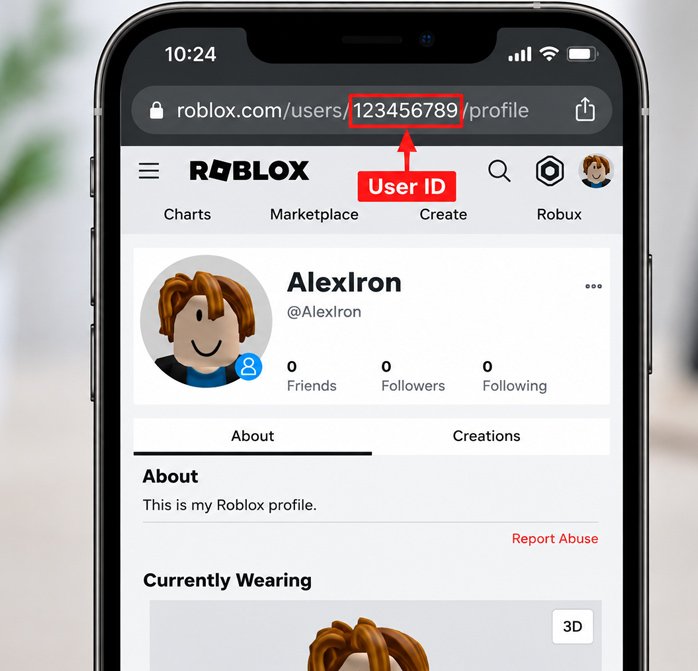
- Open a mobile browser.
Use a browser such as Chrome or Safari on your phone or tablet. - Sign in to Roblox.
Open the Roblox website and sign in to your Roblox account. - Open your Roblox profile.
Navigate to the profile page associated with your account. - View the profile page.
Make sure the page you are viewing is your actual Roblox profile. - Check the URL.
Look at the website address shown in the browser’s address bar. A Roblox profile URL may look like: https://www.roblox.com/users/123456789/profile - Identify the numeric User ID.
The number between /users/ and /profile is the Roblox user ID number. In this example, 123456789 is the fictional User ID.
If the Roblox website or app layout changes, stay focused on the URL.
How to Find Someone Else’s Roblox User ID
If you want to find another user’s ID, the method is the same. You only need information that is publicly available on that person’s Roblox profile.
- Open the person’s Roblox profile.
Navigate to the Roblox profile you want to identify. - View the profile page.
Make sure you are on the correct user’s profile before checking the address. - Check the profile URL.
Look at the URL in your browser’s address bar. For example: https://www.roblox.com/users/987654321/profile - Locate the numeric identifier.
The numbers between /users/ and /profile represent the account’s User ID. In this fictional example, 987654321 is the Roblox User ID.
A User ID is an account identifier. It is not a password, authentication token, login email, or account recovery information.
You should not ask another person for credentials just to find their Roblox ID. A publicly accessible profile URL is enough to identify the numeric User ID.
Do You Need a Third-Party Roblox User ID Finder?
For most situations, you do not need a third-party Roblox User ID finder. You can find a user ID directly from the profile information available on Roblox, particularly the numeric portion of the profile URL. This approach is simple and does not require you to share account information with another website.
If you choose to use a third-party tool for a specific purpose, be careful about what information it requests. You should never enter your Roblox password, authentication cookie, security token, or login credentials into a website just to find a user ID.
A legitimate tool should not need your account credentials to identify a publicly available Roblox ID. If a website asks for sensitive login information before showing an account ID, do not provide it. Close the site and use the profile URL method instead.
Your User ID is only an account identifier. You do not need to give another website access to your Roblox account to find it.
What Is a Roblox User ID Used For?
A user ID is mainly used to identify a specific Roblox account. Because each account has its own numeric identifier, the user ID can be useful when a username or Display Name is not enough to distinguish between accounts.
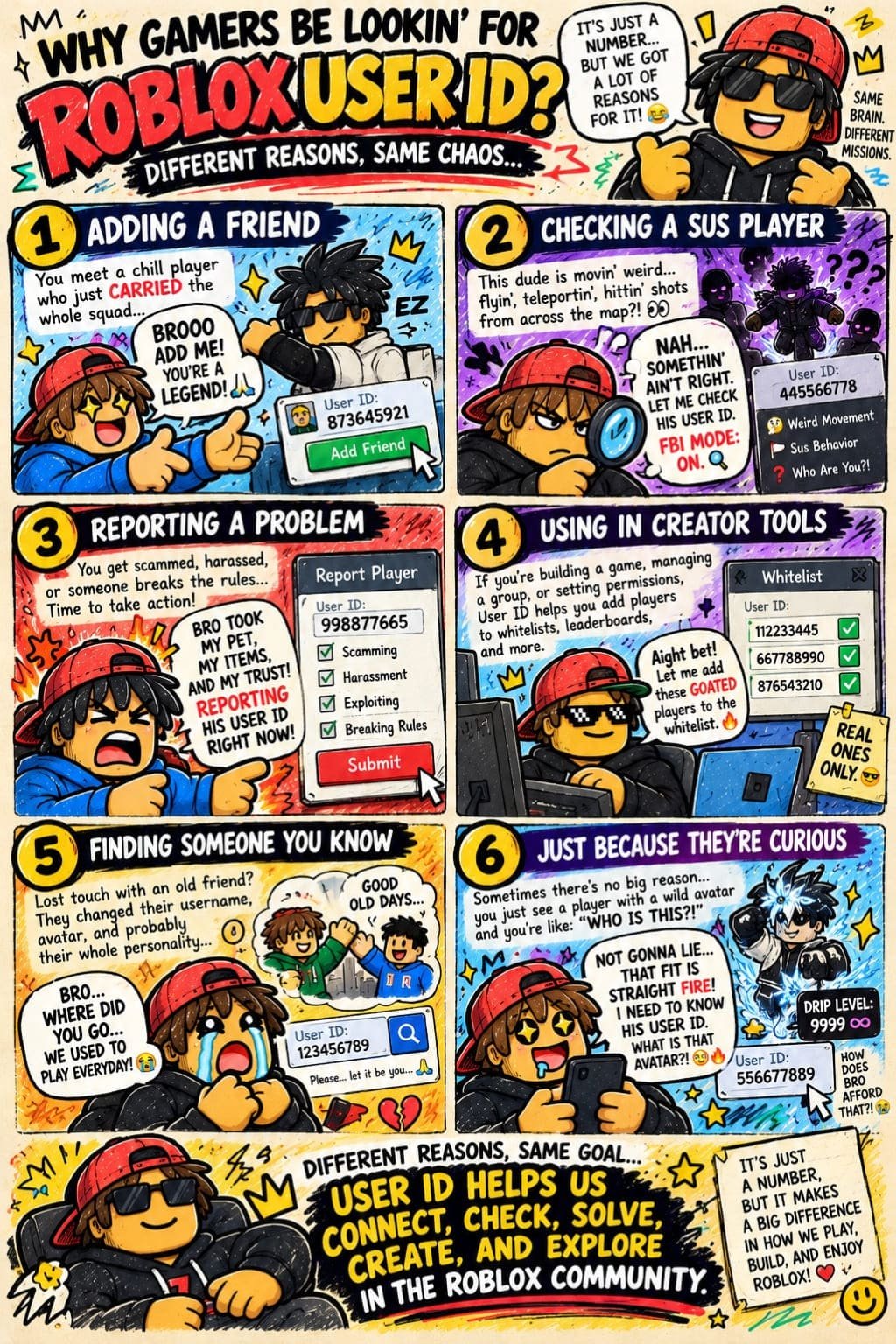
Some legitimate uses of a Roblox account ID include:
- Identifying a Roblox account: A user ID provides a consistent numeric identifier for a particular account.
- Troubleshooting account-related issues: In certain situations, providing a User ID can help identify the relevant account when seeking legitimate support or troubleshooting assistance.
- Identifying a player in Roblox-related tools: Some tools or services may use a numeric user ID to identify a particular Roblox player.
- Developer or community use cases: Legitimate Roblox-related projects or community systems may require a User ID to associate information with the correct account.
However, knowing someone’s user ID does not give you access to their account. It cannot be used to access an account, recover a password, bypass account security, change account information, or reveal private credentials.
The User ID identifies an account; it does not provide access to that account.
Roblox User ID Not Showing? Try These Checks
If you cannot immediately find your User ID, check these items before trying a third-party tool. The issue may be the profile you are viewing or how the account information is displayed.
Make Sure You Are Viewing the Correct Profile
Open the Roblox profile you actually want to identify. If you are checking someone else’s account, confirm that you have opened the correct profile rather than a similarly named account.
Check the Full Profile URL
Look at the complete URL in your browser’s address bar, not just the name displayed on the profile page. A URL such as https://www.roblox.com/users/123456789/profile contains the numeric user ID number between /users/ and /profile.
Don’t Confuse Your Username With Your User ID
Your Roblox username is not the same as your User ID. If you only see a username or Display Name, that does not mean you have found the numeric identifier.
Try Roblox in a Web Browser
If the Roblox app does not clearly show the information you need, open Roblox in a mobile or desktop web browser and view the profile there. The profile URL can make the Roblox ID easier to identify.
Check for Recent Roblox Interface Changes
Roblox can change its website and app interface over time. If the layout looks different from an older screenshot or instruction, focus on the stable method of opening the profile and checking its full URL rather than looking for a specific button or menu location.
Frequently Asked Questions
What is my Roblox User ID?
Your user ID is a unique numeric identifier associated with your Roblox account. It is different from your username and Display Name.
Is my Roblox User ID the same as my username?
No. Your username is the unique account name, while your User ID is the numeric identifier associated with the account.
Is Roblox User ID the same as Display Name?
No. Your Display Name is the name shown to other Roblox users, while your User ID is a numeric identifier.
Can I change my Roblox User ID?
Roblox does not provide a standard setting for users to change the User ID associated with an account.
Can other people see my Roblox User ID?
When a Roblox profile is viewed through the web, the numeric User ID may be visible in the profile URL.
Can someone hack my Roblox account with my User ID?
No. A User ID is not a password or login credential and, by itself, does not provide access to your account.
Final Takeaway
Finding your Roblox User ID is usually straightforward. Open your Roblox profile, check the profile URL in your browser, and identify the numeric portion between /users/ and /profile. That number is the User ID associated with the Roblox account.
The key point is to avoid confusing the User ID with other profile information. Your User ID is different from your username and Display Name. The User ID is a numeric account identifier, while your username and Display Name are names associated with your profile.
Once you know where the number appears in the profile URL, you can quickly find your Roblox ID whenever you need it.