 Posted by
 Sea of Thieves is a game designed for multiplayer. You can play Sea of Thieves multiplayer with other players as part of a crew. Cross-platform play allows you to play with other players even if you’re on different platforms, for example, a PlayStation 5 console and a PC.
However, you need to know the requirements for cross-platform play. Account terms and other details may vary by platform, so you should familiarize yourself with them beforehand to play with friends. For gamers who want to build a crew with friends in Sea of Thieves, check out this post. Learn how to play with friends and understand the cross-platform mechanism.
Can You Play Sea of Thieves With Friends?
Sea of Thieves supports multiplayer, so you can play with friends online, including cross-platform. You can invite friends to form a crew with different roles for each player on a single ship. Forming a crew is the main goal of Sea of Thieves multiplayer with friends.
You and your crew will share the same resources, missions, and ship. Crew members need to work together to reach islands, complete missions, gather resources, and more. Some will steer the ship, others will access the Map Table for navigation, and so on. For help finding islands and important locations, check out our Sea of Thieves Map guide.
The experience differs between playing with a crew and sailing the open seas where you encounter random players. When playing with a crew, you know exactly who you’re playing with, your crew consists of friends you know. Whether you’re playing with other players or with your crew, you’re both part of Sea of Thieves’ shared world.
How to Play Sea of Thieves With Friends
Many players want to know how to play Sea of Thieves with friends. So, is it easy or complicated? At the very least, you need to know which friends you want to invite and make sure they know how to accept a request or invitation.
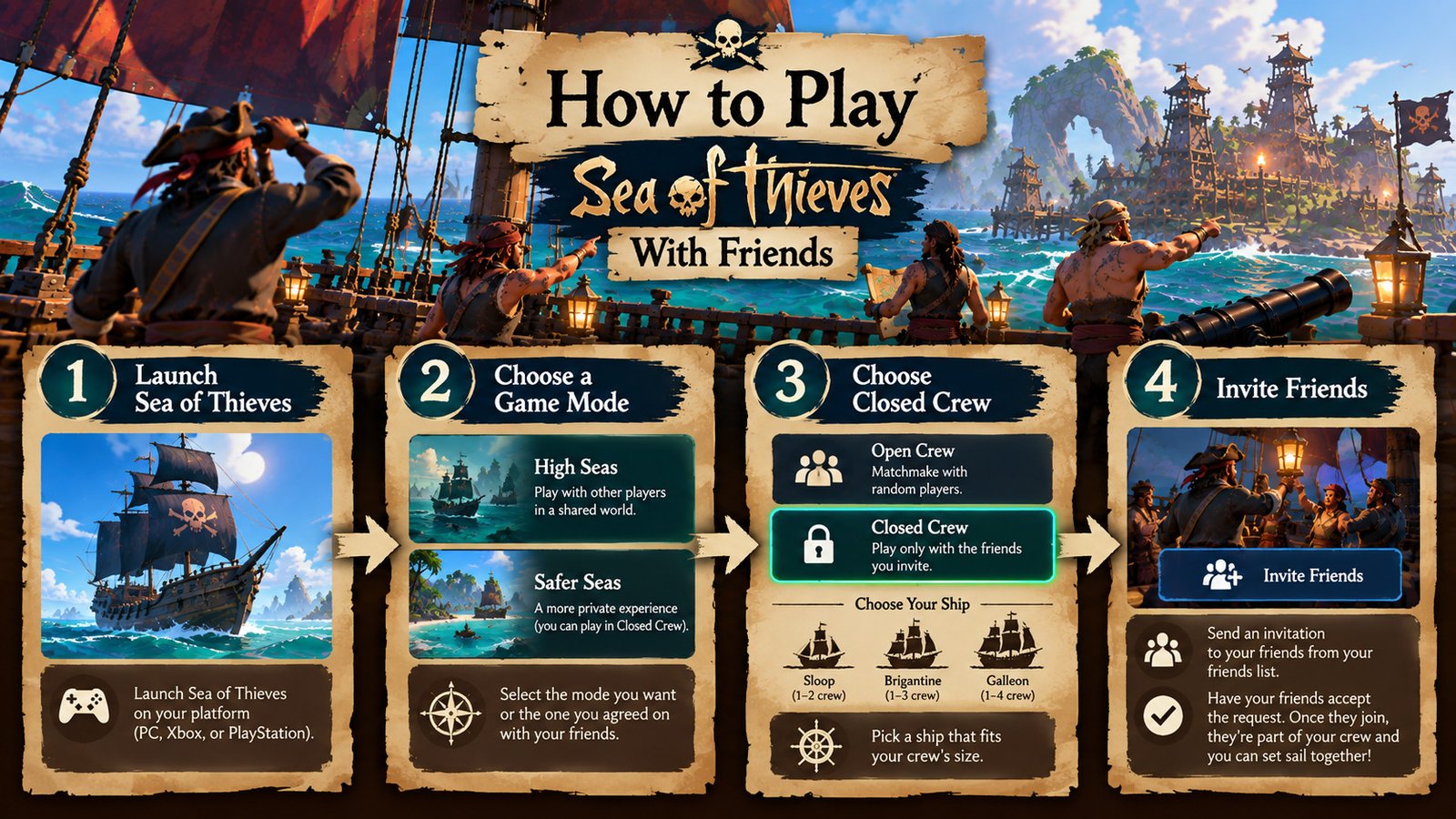
Here are the steps you can follow about Sea of Thieves how to play with friends:
- Launch Sea of Thieves
First, launch the game, regardless of which platform you’re using.
- Log in to your account
Set up your account, whether it’s an Xbox Live or Microsoft account, depending on the platform you’re using. Avoid problematic or invalid accounts for a smoother experience.
- Select a mode/session
After logging in, you’ll enter the main lobby. Choose the mode you want or the one agreed upon by the friends you’ll be playing with. “High Seas” lets you play with other players. Meanwhile, the Safer Seas mode is more private; you can play in Closed Crew mode here.
- Select the option to create a crew
You can choose the Closed Crew option to start playing with your friends. Choose your ship from among the Sloop, Galleon, and Brigantine, all three have different sizes and can be adjusted to fit your crew’s capacity. After selecting Closed Crew, only you and the friends you’ve invited will play together on the ship. This differs from the Open Crew system, which uses matchmaking to find random players to join your crew.
- Invite your friends
Look for the option or button to invite friends on the lobby screen. You can find this button in your friends list.
- Ask your friends to accept the join request
Your friends must accept the invitation to join the crew. If a new avatar appears, it means they’ve accepted the join request and are officially part of your crew. Make sure to do the same for any other friends who want to join your closed crew.
- Start a Session
Tap the “Start Session” button after ensuring the crew is full. Once the session begins, you and your crew will spawn at an Outpost, usually a tavern, where your adventure begins.
How to Invite Friends in Sea of Thieves
Playing Sea of Thieves multiplayer is limited to approved friends only. So, how to invite friends in Sea of Thieves? Depending on the platform you’re using, the process may vary slightly. Regardless of your platform, make sure to log in with a valid Microsoft account to avoid access issues.
First, open the Pirate menu using the Menu button on Xbox or the Tab key on PC. Look for “Crew” to check your crew status. Tap the “Invite Friends” option to view your friends list, whether from the Microsoft Store, Steam, or Xbox Live.
Choose which friends you want to play with. You can invite them by selecting the gamertag of the friend you want to play with. Invite up to 3 players, or up to 4 players if your ship is a Galleon, the largest ship in Sea of Thieves.
The friends you invite will receive a notification and will need to accept it to successfully join you as part of your crew. That’s all there is to inviting friends in Sea of Thieves. What if the invitation doesn’t appear?
For cross-platform play, you may need to add the other player through the appropriate Xbox/Microsoft friend system before sending the invitation.
How to Join a Friend’s Game in Sea of Thieves
Previously, you acted as the lobby owner, but what if your friend is the host? How to join friends in Sea of Thieves? You must at least accept their invitation to officially enter their lobby.
First, go to the main menu and get ready to accept an invitation from your friend. The exact invitation process may vary depending on the platform. When an invitation is sent, use the available notification or invitation option to accept it.
Tap the notification and accept it. You’ll be redirected to the corresponding lobby after accepting the invitation and joining the session or crew. Is the “Join” option unavailable? Check the account, friend connection, privacy settings, and available crew slots before trying again.
You can join a session mid-game using the Microsoft Game Bar, for example. Also, make sure there are still slots available for you to join a ship. Therefore, it’s important to know the capacity for Galleon, Brigantine, and Sloop ships before joining a game.
How Does Sea of Thieves Crossplay Work?
Sea of Thieves crossplay makes it easy for you to play across different platforms and consoles. So, what is crossplay? Crossplay means playing a game across platforms or using different devices. For example, if you’re playing on a PC and a PlayStation 5, both can still be used to access the game on the same server.
The different platforms are integrated and connected to the same server. Players from different platforms can play together through matchmaking or closed crews via the Xbox Live server. So, is Sea of Thieves crossplay?
Yes, all features, including in-game voice chat, crew invitations, friend lists, and other features, are crossplay-enabled. No matter which platform you use, as long as it’s officially supported by the developer, you’ll receive updates and feature integration, including multiplayer functionality.
All you need to prepare are the account requirements, which may vary depending on the platform you choose. Beyond that, the Sea of Thieves multiplayer features are largely the same regardless of the platform or console you use.
Is Sea of Thieves Cross-Play Between PC, Xbox, and PlayStation?
Sea of Thieves is a very flexible game in terms of the platforms it supports. Sea of Thieves crossplay PC Xbox PlayStation is enabled, so you can play with your friends even if you’re on different platforms. Check out the table below for details on cross-play support for these three platforms:
Swipe left to see more →
| Platform | Can It Play With Other Platforms? |
|---|---|
| PC | Yes. Sea of Thieves from the Windows Store and Steam can connect with PlayStation and Xbox players |
| Xbox | Yes. Xbox Series X/S and Xbox One players can play with players from PlayStation and PC |
| PlayStation | Yes. PS5 supports crossplay with Xbox and PC |
So, the Sea of Thieves ecosystem is open and flexible. No matter which of the three platforms you use, you can play with other players on that platform; you don’t have to be on the same platform as your friends. Players across platforms can communicate with each other, join lobbies, and play in crews.
See the official Sea of Thieves Support guide for more details.
Do You Need an Xbox Account to Play Sea of Thieves With Friends?
Yes, a Microsoft/Xbox Live account is a requirement for Sea of Thieves multiplayer. Make sure you have a Microsoft account associated with your own pirate. If you select the wrong account, you’ll only find an empty pirate, just like a first-time player.
See the official Sea of Thieves Support guide for account details.
Most in-game cosmetics and currencies sync to supported platforms and link to your Microsoft/Xbox Live account. However, some items are exclusive to specific platforms and therefore aren’t available on all platforms. What about the PS5? It’s best to confirm your gamertag first, as it will be difficult to fix if you link the wrong Microsoft account.
It’s easier for PC and Xbox users because of automatic integration. You just need to make sure you’re using the same Xbox account if you want to play with friends.
To make sure you’re using the right account, check your pirate or gold before proceeding with the invites.
How Many Players Can Play Sea of Thieves Together?
Want to play Sea of Thieves together? You should know about crew sizes first, as there are limits. The number of players who can play with you depends on the crew type or ship you choose. Here are the details:
Swipe left to see more →
| Ship/Crew Type | Crew Size |
|---|---|
| Sloop | 1-2 Players |
| Brigantine | 2-3 Players |
| Galleon | 3-4 Players |
Can You Play Sea of Thieves With Friends on Different Platforms?
Sea of Thieves lets you and your friends play on different platforms. To make it easier to understand, let’s consider a scenario where three of your gamer friends use different platforms.
Friend A on PC (Steam)
Friend B on Xbox
Friend C on PlayStation 5
Sea of Thieves crossplay lets you play with three friends even if you’re on different platforms. You can form a crew of up to 4 people with your friends. As long as all three of your friends purchased the game through an official source, crossplay is possible.
For cross-platform invitations, you may need to add the other players through the appropriate Xbox/Microsoft friend system. Decide who will be the host or create the lobby. That person will then invite the other players. Another important consideration is the ship or crew type.
You can only play with 4 people on the same ship if you choose a Galleon, which can accommodate 3–4 players.
Sea of Thieves Multiplayer Not Working: What to Do
If you’re experiencing issues with Sea of Thieves multiplayer not working, try the troubleshooting guide below:
Check Your Internet Connection
Make sure you’re using a stable and fast internet connection to avoid lag, as Sea of Thieves is a game that requires a significant amount of data.
Check the Game and Platform Status
Check if a specific platform is experiencing an outage, as this can prevent invitations from going through.
Make Sure Everyone Is Using the Correct Account
Log in to the account that has been added as a friend.
Check Friend/Privacy Settings
Disable any privacy restrictions that were previously enabled in the Online Safety/Privacy settings so you can access Sea of Thieves cross platform multiplayer.
Restart the Game
Bugs or errors can sometimes be resolved by restarting the game.
Update the Game
Make sure all players are using the latest version of Sea of Thieves to reduce compatibility and connection problems.
Try the Invitation Again
Verify that the friend/account connection is correct, and try inviting them again if the previous attempt failed.
Frequently Asked Questions
Is Sea of Thieves multiplayer?
Yes. The game is designed for multiplayer with a crew system where your friends can join.
Can you play Sea of Thieves with friends?
Yes. You can set the mode to “Closed Crew” so that only your friends can join the crew.
Is Sea of Thieves cross-play?
Yes. By default, this game supports cross-play, meaning it can be played across platforms (Xbox, PC, and PlayStation).
Can PC and Xbox players play Sea of Thieves together?
Yes. If you’re on PC and your friend is on Xbox, you can play together in this game.
Can PlayStation players play Sea of Thieves with Xbox players?
Yes. However, make sure PlayStation players link their accounts first so they can play with Xbox players.
How many people can play Sea of Thieves together?
It depends on the ship you choose; the Galleon holds the most, up to 4 people.
Can you play Sea of Thieves solo?
Yes. You can play solo on a Sloop and complete all tasks by yourself besides playing Sea of Thieves multiplayer.