 Posted by
 You can play Roblox, but only with specific users on a private server. So, how to make a private server in Roblox? Before we begin the tutorial, you should know that users can only find private servers in certain experiences within Roblox.
That’s right, not all experiences on Roblox offer private servers. If this feature is available in the experience you want to play, the private server will appear in the “Servers” section. This post can serve as your ultimate guide to setting up a Roblox private server.
What Is a Private Server in Roblox?
A private server is a server specifically created for a particular experience on Roblox so that only certain users can play there. This server allows the experience owner to control which users can play. The availability of private servers on Roblox depends on how the experience’s creator or developer configures the server.
Unlike public servers, the owner can control which users can access the experience. Not all experiences support private servers. So, check first to see if the experience in question supports this feature.
Can You Make a Private Server in Every Roblox Game?
Private servers aren’t available for all games on Roblox. The most important requirement is that the creator or developer must first enable the private server feature so that users can create or use the server. If the owner has already enabled it, you can go to the “Servers” section within the experience and find the “Private Servers” option.
So, don’t assume there’s a problem with your account just yet; the creator might not have enabled it yet. Before you try to fix this or that, the first step is to make sure the private server feature is enabled for the relevant experience.
How to Make a Private Server in Roblox
You can create a private server on Roblox after confirming that the experience supports private servers. So, how to make a private server in Roblox? Follow these steps to start creating a private server on Roblox.
Step 1: Open the Roblox Experience
Roblox offers a variety of experiences you can play on a private server. You can explore experiences using the category feature or the search function. If using categories, you can choose from Recommended, Popular, Featured, or Top-Rated.
If you already know which experience you want to set up a private server for, you can search for it. However, don’t forget to check whether the game supports private servers or not.
Step 2: Go to the Servers Section
How to make a private server in Roblox? After selecting a specific experience and confirming that the private server feature is enabled, go to the experience’s main page. There, you’ll find the Servers section. The interface may look slightly different depending on whether you’re using the Roblox website or app.
What’s certain is that the experience’s Servers section is where you can manage private servers and other available settings.
Step 3: Find Private Servers
Look for “Private Servers” after entering the “Servers” menu. You may or may not find this option, depending on the creator’s configuration settings. If it’s enabled by the creator, you’ll be able to view private servers and create a new server or join an existing one.
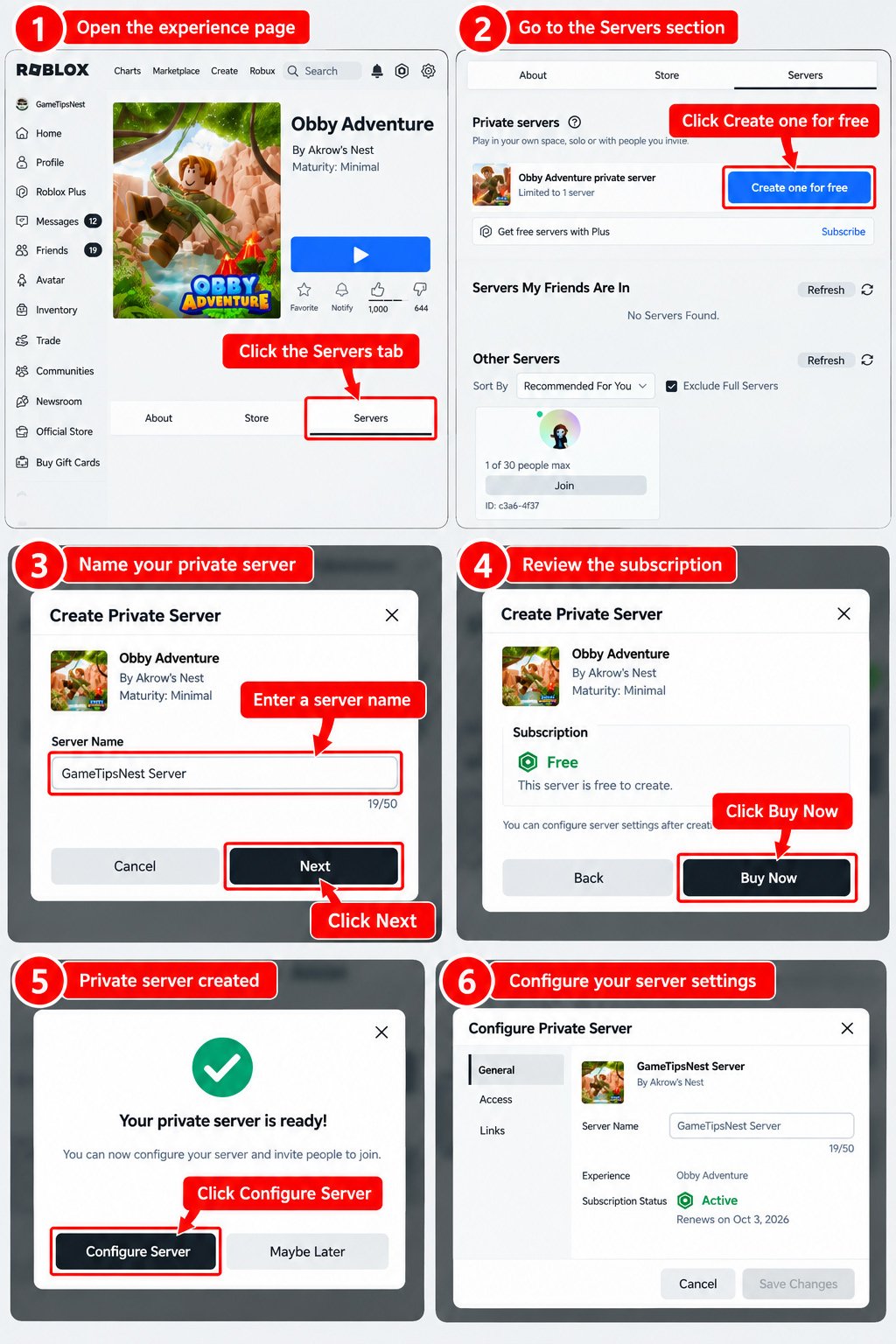
Step 4: Select “Create Private Server”
How to make a private server in Roblox? Roblox allows you to create a private server in experiences that support it. Select the option in the Private Servers section to create a new server.
Review all the information and make sure you fully understand it. Different experiences may have varying details or layouts regarding these Roblox private server settings.
Step 5: Name Your Server
Roblox users are free to name the servers they create. Make sure the name is appropriate and easy for other users to recognize. Use a simple name for your server so that users looking for it can easily recognize it.
Step 6: Complete the Creation Process
How to create a private server in Roblox? Review the subscription information and any displayed cost before completing the creation process. If the server requires Robux, Roblox will show the price before you complete the purchase.
Roblox private server cost may vary between experiences, and settings may differ depending on the creator’s experience. If you don’t see the Robux cost information, follow the instructions provided by Roblox.
Step 7: Open Your Server Settings
Configure your server settings, including who can access the server and the server link. Depending on the available settings, you can allow specific users or your friends to access your private server. You can also create a link so that specific users can easily join your private server.
How to Configure Your Roblox Private Server
How to make a private server in Roblox? You’ll need to complete the configuration after creating a private server. First, keep in mind that server settings may vary depending on Roblox updates, account settings, creator settings, or regional factors. Here are some settings you can configure in a Roblox private server:
- User access to the server: You can determine which users can access your private server. Add specific users if this option is available for the experience.
- Friends: If available, you can allow your friends to access the private server.
- Server link: Manage the link if you want to share private server access with other users; make sure this feature is available in the experience.
There are several other server settings as well, and they may vary depending on the experience or game. As Roblox is updated, the interface or names of settings may change.
How Much Does It Cost to Create a Roblox Private Server?
You should know that you don’t always have to pay Robux to create a private server in a Roblox experience. Some require Robux, while others do not. Creators or developers can set their own pricing for these private servers, which makes the cost vary widely.
So, you can’t assume that all experiences on Roblox have the same price. You can find out how much a Roblox private server costs when you create one. Don’t forget to review other terms and conditions beyond pricing before creating a private server.
Roblox Plus subscribers can also get access to free private servers across supported experiences, so the cost may depend on both the experience and the account’s available benefits.
Can You Create a Free Private Server on Roblox?
You might not need to spend Robux when you want to create a private server. This is because some experiences may not require a Robux payment. You can find experiences on Roblox that have Robux pricing, and others that don’t.
Depending on how the creator sets the pricing for their experience, you can either create a free or paid private server. It’s best to carefully review all the information upfront when setting up a server.
Don’t even think about bypassing the fees using scripts, exploits, or other unofficial methods. These methods don’t always work and could put your account at risk.
How to Make a Private Server on Roblox Mobile
For Roblox mobile users, you can create a private server when the experience supports the feature. So, how to make a private server in Roblox mobile? The process is not much different from creating one using the website.
You’ll need to find the experience you want to play on a private server. Of course, you’ll need to check first whether the developer has enabled the private server feature. If not, it’ll be a waste of time. Only when this feature is active can you create a private server for that game or experience.
On the experience’s main page, look for the “Servers” section. In that menu, you’ll find the “Private Servers” option; choose whether to create a new one or join an existing server. Since you want to create a private server on Roblox mobile, select the “Create” option in the “Private Servers” menu.
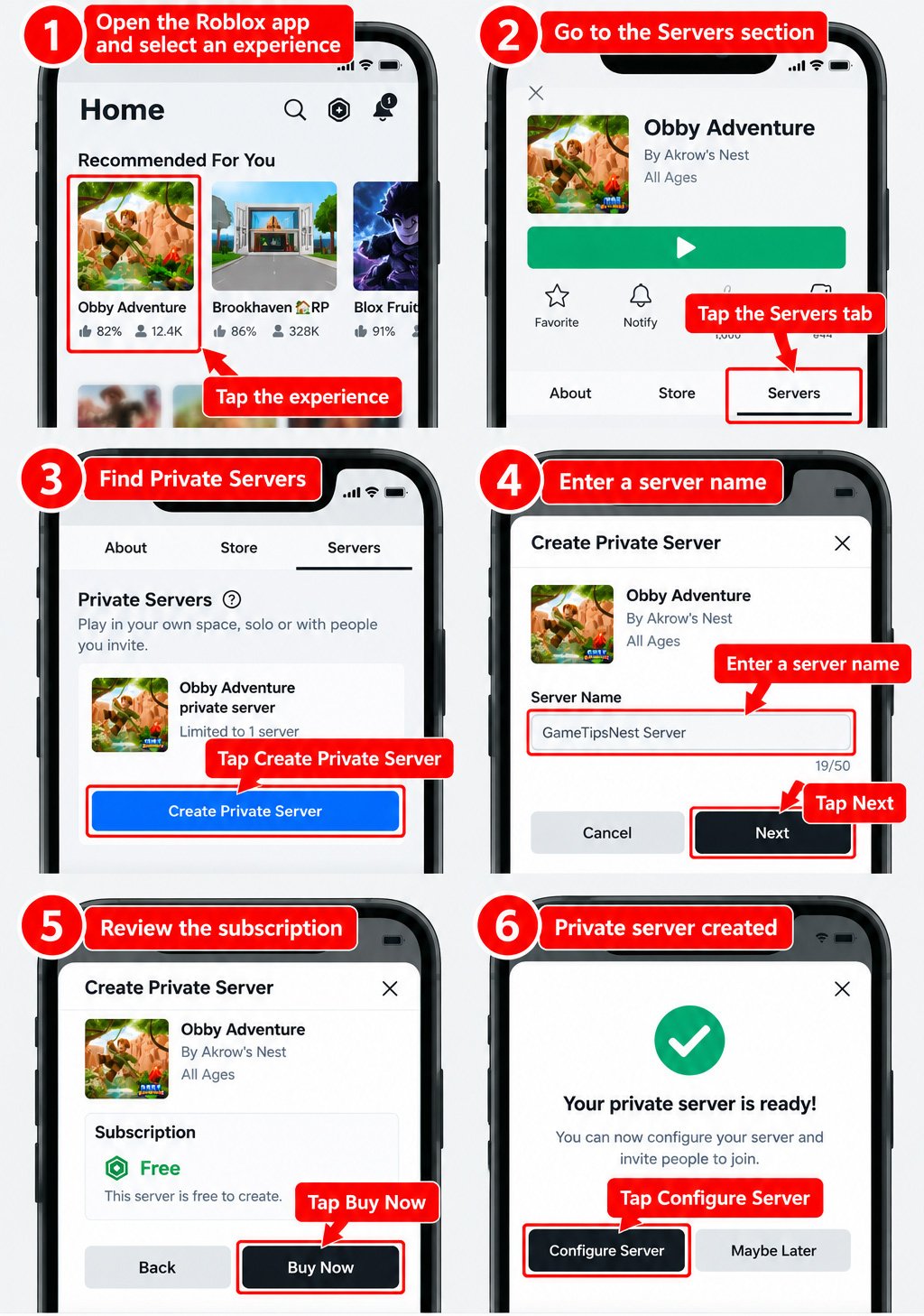
Keep in mind that you won’t always find private servers in the “Servers” section, as settings can vary between different experiences. The mobile interface may look slightly different from the website, but the main steps remain similar.
It’s best not to get too hung up on the exact names or positions of elements. Just follow the instructions as they appear on your screen.
Why Can’t I Make a Private Server in Roblox?
There are various factors that might prevent you from creating a private server. These could include the experience itself, privacy settings, or issues with the main Roblox server. Check out the points below to learn about common issues and simple troubleshooting tips:
1. The Experience Doesn’t Support Private Servers
This is the most likely cause because private servers aren’t always available in every Roblox experience. No matter how you configure your account, you still won’t be able to create or join a private server.
You don’t need to reinstall or update Roblox, that’s not the issue. You’ll need to check the specific experience first to see if the creator has enabled private servers or not.
2. The Private Servers Section Is Missing
Sometimes Roblox private server not showing, and that doesn’t mean there’s a problem with your account privacy. You’ll only find this feature in a Roblox experience if the creator has enabled private servers. Before checking your account settings, try to confirm whether the developer has enabled private server access for that experience or not.
3. The Server Requires Robux
You might be having trouble creating a private server because the experience requires Robux and you don’t have enough available. However, some private servers may be free depending on the experience or available Roblox Plus benefits. Check the displayed pricing before creating the server.
If you don’t have any Robux or don’t have enough, you won’t be able to pay to create a private server on Roblox. Keep in mind that prices can vary from one experience to another. The creator can set the pricing, whether it’s a fixed fee or free.
4. Roblox Account or Privacy Restrictions
Your account may have privacy or parental-control settings that affect who can access private servers. Other Roblox features may also be affected by these settings. Try checking your parental controls or privacy settings first, as they can affect your account’s access flexibility.
5. Temporary Roblox Issues
If Roblox is experiencing a service issue, the problem may resolve after the service is restored. You can try refreshing Roblox, reopening the app, or reloading the Roblox website. Check whether you can now access the private server feature.
If you still can’t access the feature, check whether your Roblox app is up to date and try logging out and back in. You can also switch from the app to the website and vice versa.
Errors can also occur on individual experience pages. You can exit the experience page and re-enter it to check the availability of private servers.
Private Servers vs. Regular Roblox Servers
There are reasons why many Roblox users play on private servers, primarily related to privacy, targeted participation, or security factors. Let’s compare how private servers and regular servers differ on Roblox:
Swipe left to see more →
| Aspect | Private Server | Regular Server |
|---|---|---|
| Access Control | More controlled; selected & exclusive users | More open; accessible to public players |
| Access Settings | There are access settings managed by the server owner | Players join based on the experience’s public server availability and Roblox’s matchmaking system |
| Availability | Available only when supported by the experience | Generally available to public players |
| Server Costs | May or may not require a Robux transaction, depending on the creator’s pricing configuration | No private-server subscription is required to join |
If you need to play in a more restricted environment, where only specific users can access it, a private server can give you more control over access. If you’re okay with playing with random public players, a regular server provides the standard public experience.
Frequently Asked Questions
Can I create a private server in any Roblox game?
Not always, because not all experiences on Roblox support this feature; developers can choose whether to enable private servers or not. You can check the Roblox Servers section in each experience to see if private servers are active.
Are Roblox private servers free?
Access to a Roblox private server may or may not require Robux. You can view the pricing details when creating a private server.
How do I know if a Roblox game has private servers?
Open the experience you want to play in Roblox and navigate to “Servers.” There, you’ll find a “Private Servers” section if the experience supports it.
Can I create a private server on Roblox Mobile?
Yes, you can use your mobile device to create a private server. Find the “Servers” menu on the experience page, go to “Private Servers,” and create one. Make sure you create a private server for an experience that supports this feature.
Can I change my private server settings?
Owners can adjust the settings on the private servers they create. However, the specific settings may vary from one experience to another.
Why is the “Private Servers” option missing?
If the experience in question hasn’t enabled private servers, you won’t be able to create or join that server. Other possible causes include privacy settings on your account or a bug or error with the Roblox service.