 Posted by
 Your display name is different from your username on Roblox, and you can change it if needed. So, how to change your Roblox display name? First, you should know that your display name is the name that appears on your Roblox avatar and can be the same as other players’.
Meanwhile, a username must be unique (it cannot be the same as anyone else’s) and makes it easier for you to log in. You can easily change your display name through your account settings. This post will guide you through the steps to change your display name and the rules you need to know.
What Is a Roblox Display Name?
Every Roblox user has a display name, this is the name that appears above your Roblox character. This name also appears on your profile and in chat. So, your display name is easily visible to other Roblox players because it appears in many different contexts.
This is different from a username, which serves as a unique identifier for each player on Roblox, while a display name is simply for showing your name to other players. You can change your display name as long as it complies with Roblox’s rules. Changing your display name does not change your username, and vice versa.
Unlike a username, which must be unique, your display name can be the same as another player’s. Players might want to change their display name to have a fresher, more unique, or newer name, to keep up with trends, or to make it a better fit. Understanding how the two differ can at least help you when changing either your username or your display name.
How to Change Your Roblox Display Name
Just like changing your name in other games, changing your Roblox display name is easy. So, how to change your Roblox display name? You can follow the steps below:
Step 1: Log in to Roblox
Select the account for which you want to change the display name. If you want to change the name for multiple accounts, you’ll need to do so one by one using Roblox’s features. Choose one account and log in to Roblox with that account.
Step 2: Open Settings
Depending on whether you’re using the mobile app or a browser, navigate to the Settings menu provided by Roblox. On the Roblox mobile app, tap the three-dot icon to access Roblox settings.
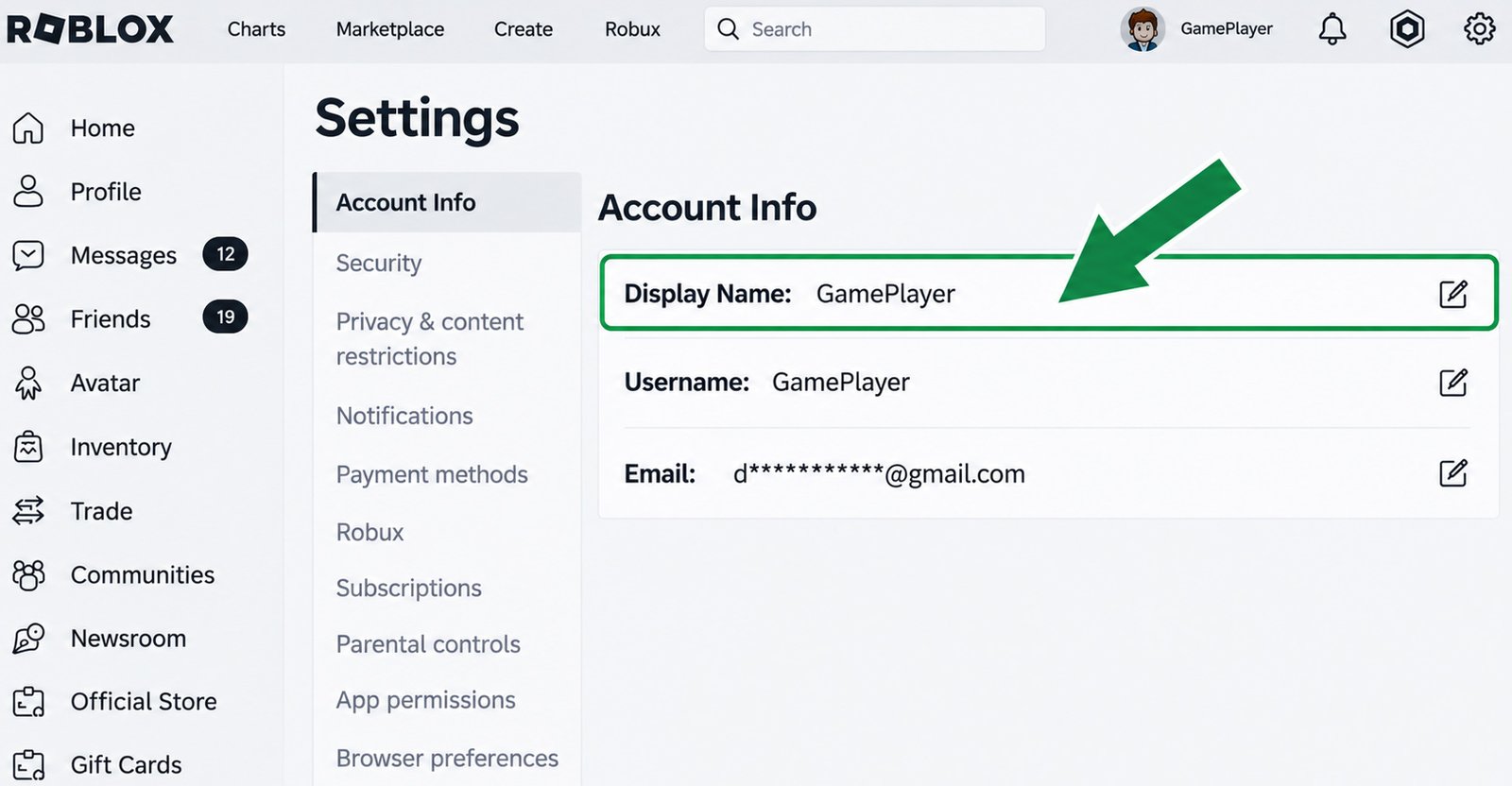
Meanwhile, in a browser, look for the gear icon. Both will take you to the settings, including the feature to change display name on Roblox.
Step 3: Go to Account Info
How to change your Roblox display name? Once you’re in the Settings menu, look for the Account section, which displays various account details. You can manage your account information through this section, including changing your display name. In the Settings menu, you can also configure Parental Controls, Privacy, and Security.
Step 4: Find Your Display Name
In the Account Info section, you can see your display name and username. You can also find other information such as your email, passkey, birthday, language, and so on. Your display name is at the very top of the list. Your username is listed directly below it.
Step 5: Select the Edit Option
How to change your Roblox display name? To the right of the Display Name, there’s an icon showing a pencil on a piece of paper. Tap that icon to start changing your display name. Whether you’re using the mobile app or a browser, the interface for the Display Name section is the same. You can select the edit option in the same location for both methods.
Step 6: Enter Your New Display Name
Decide on and double-check your new name, make sure it doesn’t contain any offensive or derogatory content. After you tap the edit button, a pop-up window will appear. You’ll see a notice stating that you can only change your name once every 7 days.
Type your new name in the input field. Tap the “x” button to clear everything and type again.
Step 7: Save the Change
Double-check to make sure your name details are correct. If there’s a mistake and you accidentally tap the Save button, you’ll have to wait 7 days before you can change it again.
How to change your Roblox display name? At the bottom of the input box, you’ll find a blue Save button. Tap that button to save your changes.
How to Change Your Roblox Display Name on Mobile
Do you play Roblox on your smartphone? Changing your Roblox display name on mobile is also easy. You’ll need to find the menu to manage your account info in the Roblox app. Here are the steps you can follow:
- Open the Roblox app
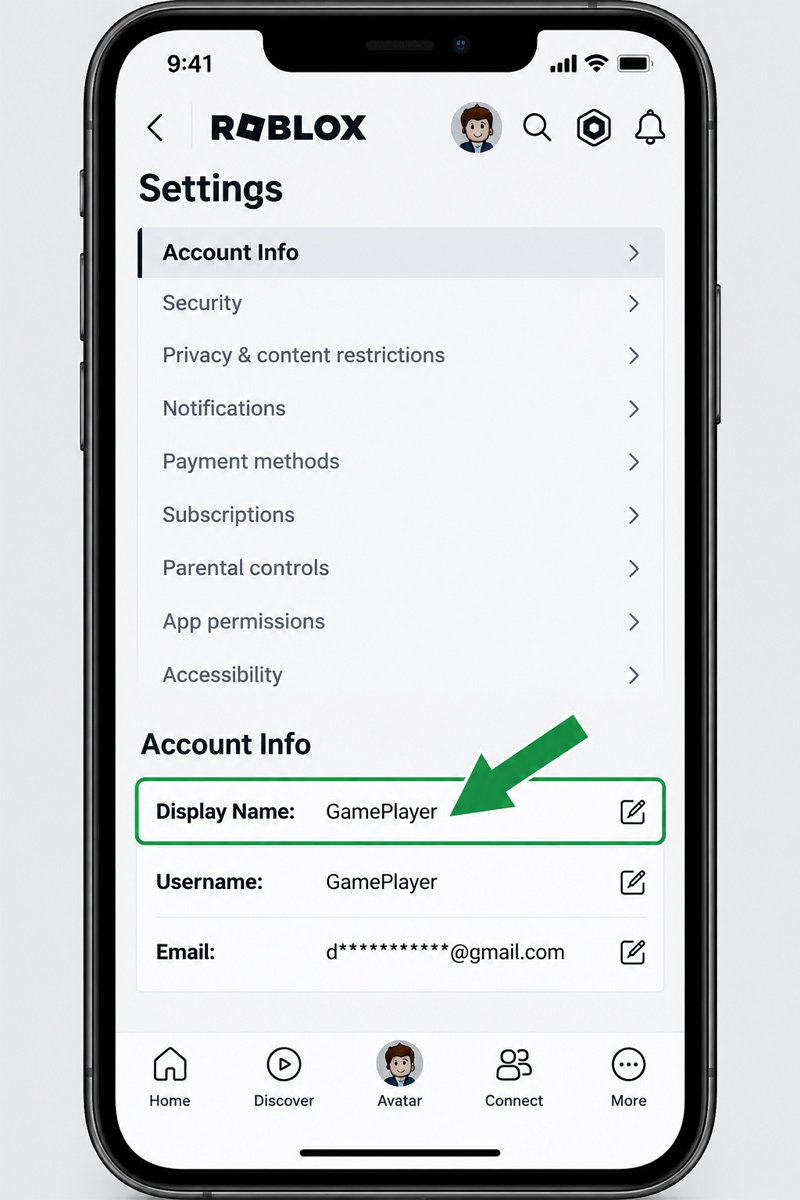
- Open Settings (the three-line icon in the top-left corner of the screen)
- Navigate to the Settings menu
- Select Account Info
- Find “Display Name”; it’s at the top of the list
- Tap the pencil/note icon to the right of “Display Name”
- Enter your new Display Name
- Tap the Save button to save the change
So, how is this different from the browser? In the browser, the Settings menu is located under the gear icon in the top-right corner of the screen. Account Info settings will automatically appear in a drop-down menu; this differs from the mobile version, which uses a list.
The steps that follow are more or less the same as how to change your Roblox display name on mobile.
Is Changing Your Roblox Display Name Free?
You can change your display name on Roblox for free. Many players need to change their display names for various reasons. Fortunately, Roblox has made this feature flexible, unlike changing your username, which requires you to spend Robux.
So, you don’t need to buy Robux first if you just want to change your display name.
How Often Can You Change Your Roblox Display Name?
Even though changing your display name doesn’t require Robux and allows for flexibility, even if it’s the same as another player’s, there are certain limitations. Roblox display name change only work once per week, or every 7 days. Once you’ve confirmed the display name change, you’ll need to wait 7 days before you can change it again.
Before the 7 days are up, this feature is disabled, and you won’t be able to tap the “Save” button. In addition to knowing how to change your Roblox display name, you also need to be aware of the rules surrounding it. Therefore, be careful when typing, especially when tapping the “Save” button, and avoid rushing to prevent typos.
Roblox Display Name Rules You Should Know
To ensure you can smoothly change your display name on Roblox, familiarize yourself with the rules. Every display name must comply with the Roblox Community Standards. You must choose a name that does not contain sensitive elements to avoid being rejected by the system.
Yes, not all names are accepted by Roblox for users who want to change their display names. Even though changing your display name is very flexible, that doesn’t mean you’re free to choose any name you want. All changes to your profile are still subject to Roblox’s system and rules.
If the name you’re using is rejected by the system, try finding an alternative. Also, remember that your username and display name are different. You don’t need to worry about your name being rejected because it’s the same as another player’s display name. Changing your display name won’t change your username because they are two separate things.
Why Can’t I Change My Roblox Display Name?
There are several factors that prevent you from changing your display name. You must know them in addition to how to change your display name in Roblox. Check out the causes and how to fix them below:
1. You Recently Changed Your Display Name
Try to recall when you last changed your display name. If it was recently, the cooldown period may not have ended yet, and you’ll need to wait it out. Roblox limits display name changes to once every 7 days.
2. The Display Name Violates Roblox Rules
How to change Roblox display name? Review Roblox’s community standards to see what kinds of names are not allowed first. If your name violates their rules, it may be rejected, so you’ll need to find an alternative. Use a safe name in any language to avoid rejection.
3. Roblox app or website issue
Failure to change Roblox name is sometimes due to an issue with the Roblox platform. The Roblox website or mobile app you’re using may be experiencing problems. You can wait a few moments and then try saving your new name again.
Try refreshing the webpage or restarting the app to reset the Roblox system. Also check if your Roblox app hasn’t been updated in a while. If so, visit the App Store or Play Store to check and update it immediately.
Another method you can try is to log out of your account and then log back in. Sometimes the problem only occurs when changing Roblox display name on mobile app or the website. You can switch platforms to see if you’re still unable to change your display name or if the issue persists.
4. The Roblox interface has changed
Major updates can make the Roblox interface look different than before. You might get confused by the steps due to changes in button positions, icon shapes, feature names, or other details. You can explore the buttons or icons on the Roblox home page to find “Account Info,” where you can change your display name.
Can You Use Any Name as Your Roblox Display Name?
Not every name you can think of can be used as a display name on Roblox. Roblox has a strict moderation system that will reject any entries that violate community standards. The name you submit might be inappropriate and therefore rejected by the system.
Examples include names that refer to criminal acts, adult activities, profanity, and insults. Roblox moderation will automatically reject such names.
What Happens After You Change Your Display Name?
How to change your Roblox display name successfully? Make sure you tap the Save button to process your Display Name change. After that, your new Display Name will officially be available for use. This only changes your Display Name, not your username. You’ll need to tap a different edit button if you want to change your username.
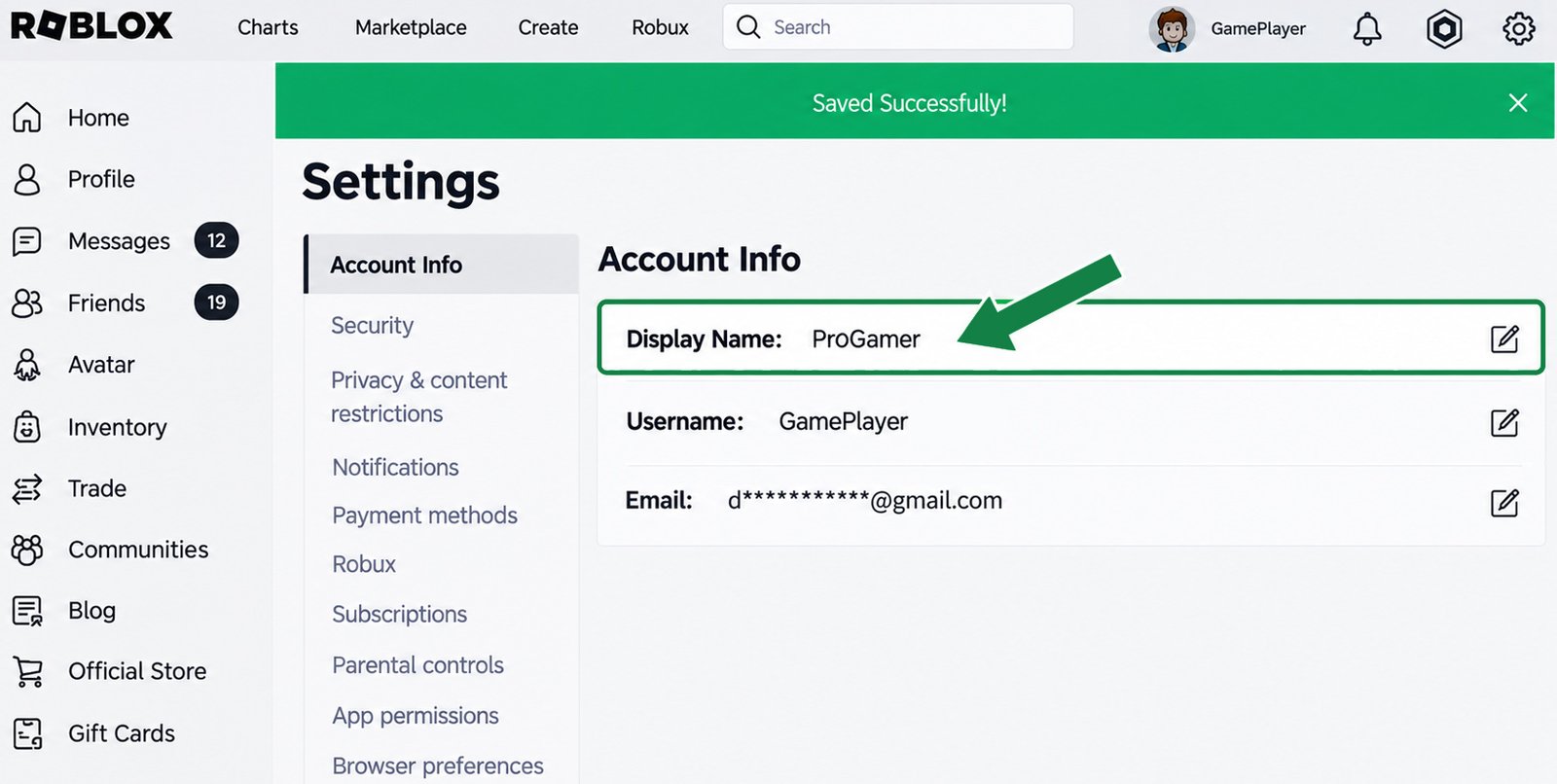
Remember that your Roblox account display name is the name of your account that appears to other users. Meanwhile, your username is the unique name that identifies your account. Changing your display name does not create a new account on Roblox.
You also don’t need to switch accounts to have the same name. Roblox allows you to change your display name once a week using the same account. The new name will appear immediately, but there may be a delay if there are issues with the main server or your network.
Display Name vs. Username on Roblox
The table below clarifies how Roblox display name and username differ on Roblox:
Swipe left to see more →
| Feature | Display Name | Username |
|---|---|---|
| Visible name | Yes | Yes |
| Unique identifier | No | Yes |
| Can be changed | Yes; subject to Roblox rules | Yes; subject to Roblox rules |
| Same purpose | No | No |
Frequently Asked Questions
Can I change my Roblox display name for free?
Yes, changing your display name is free on Roblox. You don’t need Robux to change it.
How often can I change my Roblox display name?
You’ll need to wait 7 days from the last time you changed your display name if you want to change it again. Double-check the name you enter before confirming, since you can only change it once per week.
Can I change my display name on mobile?
Changing your Roblox display name on mobile works too. You can find the Roblox display name settings under “Settings,” which you can access by tapping the three-line icon.
Why won’t Roblox let me change my Display Name?
This could be due to an inappropriate name choice or one that violates Roblox’s community standards. Other causes include the cooldown period not being over or a bug in the Roblox web/app system.
Does changing my Display Name change my username?
No. Changing your username and changing your display name are two different things. Changing one will not change the other.
Can other players see my new Display Name?
Yes, other players can see your new Display Name through chat, your profile, the leaderboard, and other features that display player names.