 Posted by
 Do you have any Roblox Limited or Limited U items? You can resell eligible items to earn Robux. Roblox has specific requirements for reselling, including a completed holding period and an active Roblox Plus subscription.
We’ll provide a complete guide to help you sell items on Roblox.
Note: Roblox may change its selling requirements, holding periods, or account features over time. Check Roblox Support for the latest information before listing an item for sale.
Can You Sell Items on Roblox?
You can sell items on Roblox. However, not all items you own on Roblox can be resold to other players. According to Roblox Support, you can only resell Limited and Limited U items. So, how do you identify if an item is Limited or Limited U?
You can look for a special label on the item’s detail page or in the Marketplace. This label appears at the bottom of the item. Therefore, you can only resell an item if it has the “Limited” or “Limited U” label.
Even if you have a lot of clothing, gear, avatars, and accessories, you can’t always resell them. Whether you can sell an item on Roblox depends on whether it is an eligible “Limited” or “Limited U” item.
What Roblox Items Can You Sell?
There are at least two categories of Roblox items you can sell: Limited and Limited U. So what’s the difference between these two categories? Here’s a breakdown:
Limited
Limited items are collectible items that can be resold when they meet Roblox’s resale requirements.
Limited U
Unlike Limited Unique (Limited U), Limited U items have a specific number of copies, and each copy has a unique serial number. You can resell items in both categories. However, understanding the differences between them can make it easier for you to manage the items you want to sell.
What Do You Need to Sell Items on Roblox?
Selling items on Roblox is straightforward as long as the requirements are met. Before you start, make sure you meet the following requirements:
- Roblox Plus Subscription
- Limited or Limited U items that you want to sell
- The item meets the holding period requirement
Once you’ve confirmed all three of the above requirements, you can start Roblox item selling. Make sure your Roblox Plus subscription is still active. Also double-check whether the “Limited” label appears below the item.
How to Sell an Item on Roblox
Roblox provides an item-selling system for eligible items. You can follow the steps below:
Step 1: Go to the Item’s Details Page
First, open the details page for the item you want to sell. You can access it through the Roblox Marketplace. Double-check to make sure you’re on the correct details page for the item you want to sell.
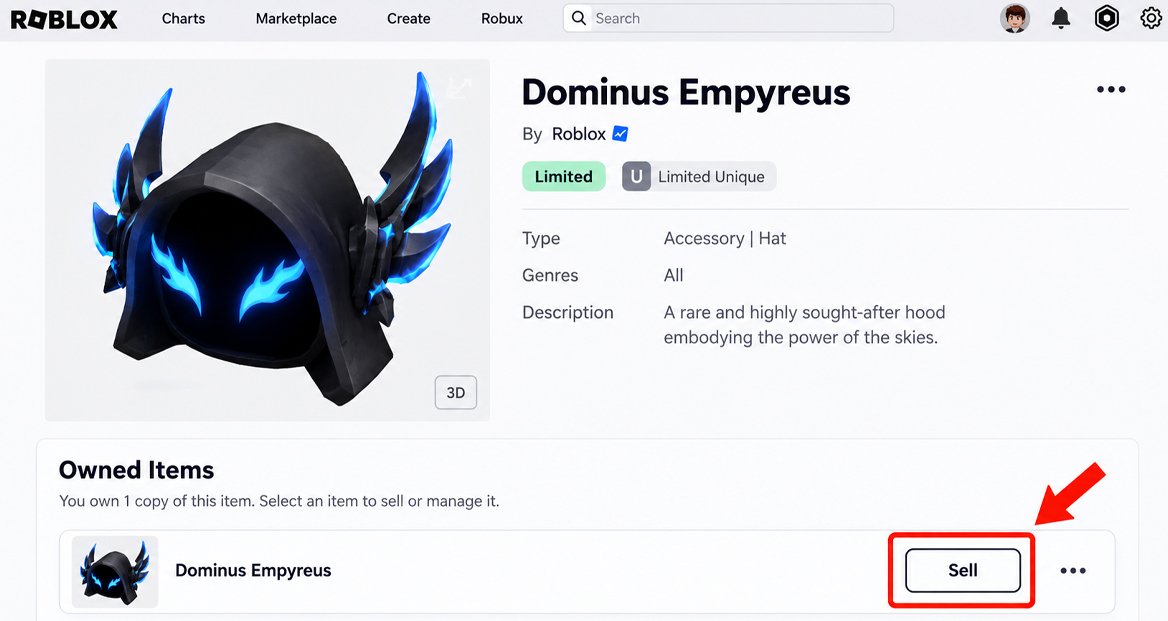
Step 2: Find the “Owned Items” Section
Scroll down until you find “Owned Items.” You’ll find this section below the price chart.
Step 3: Select the Specific Copy
Choose which copy you want to sell if you own multiple copies of the item.
Step 4: Select the “Sell” Option
Next to the item, you’ll see a “Sell” button. Before clicking it, double-check whether the item’s status is “Limited” and whether it has met the holding period requirement.
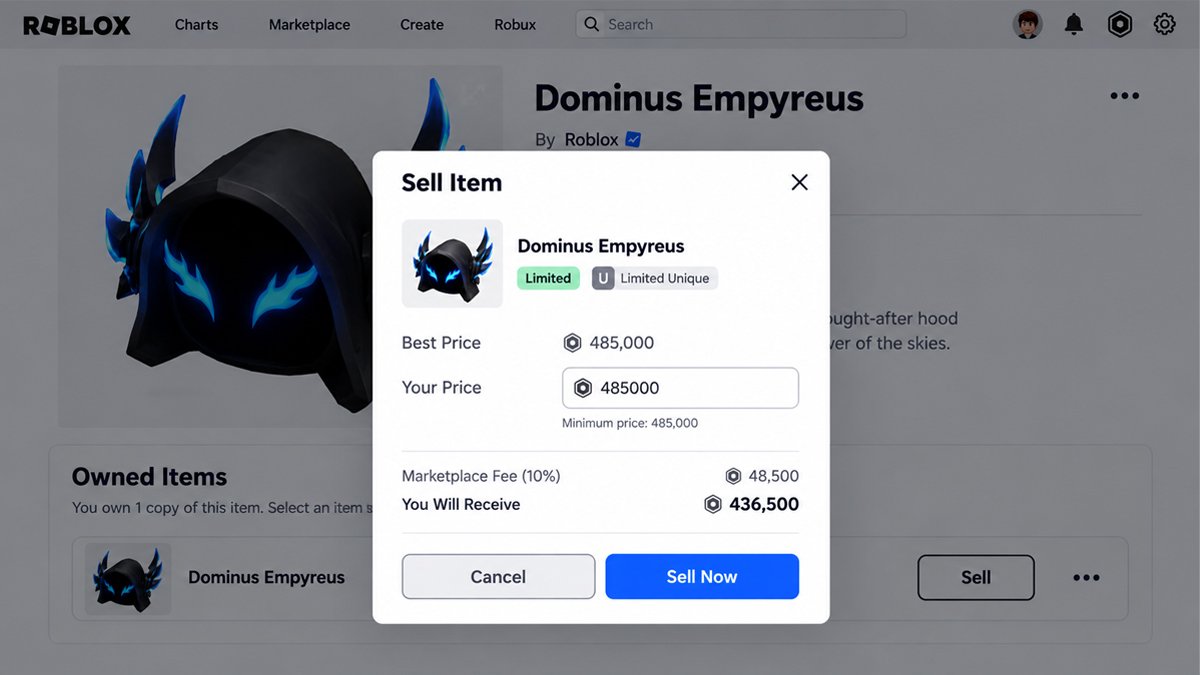
Step 5: Set the Selling Price
Set the selling price for the item you want to sell. Consider the price carefully before continuing.
Step 6: Select “Sell Now”
Once you’ve confirmed the price, select “Sell Now” to list the item for sale. That’s the basic process: find an eligible item you own, open “Owned Items,” set the price, and select “Sell Now.”
When Can You Sell a Limited Item?
Before you sell an item on Roblox, you need to understand the holding period first, as it’s a key requirement. You can only resell an eligible Limited or Limited U item after the applicable holding period ends. So, how long is the Roblox holding period?
After you purchase an item (Limited/Limited U), it enters a holding period of up to 30 days. You cannot resell the item until that period ends. So, even if you already own a Limited item, you can’t always sell it. Therefore, be sure to check the holding period first.
How Do You Know When an Item Is Ready to Sell?
Since not all items can be sold, you need to know how to determine whether an item is available for sale on Roblox. Check the “Sell” option to see if it’s available. This button determines whether you can sell an item or not.
Open the item’s details page and navigate to the “Owned Items” section to find out. What if the Roblox Sell button isn’t available? You can double-check whether the item in question is labeled “Limited” or “Limited U” (a mandatory requirement).
If it’s labeled “Limited” or “Limited U,” check whether the applicable holding period has ended. Also make sure your account is subscribed to Roblox Plus and meets other reselling requirements. Finally, the reselling feature may be restricted depending on your region.
Not all of your collectible items can be resold. Check whether they meet Roblox’s eligibility requirements, including the holding period, the “Limited” or “Limited U” label, and a Roblox Plus subscription. For regional availability, check Roblox Support for the latest rules.
What Happens After You Sell an Item?
Selling an item on Roblox means you’re listing it so that ownership transfers to another player who buys it. Your Robux won’t increase immediately after the item sells; the status will first change to “Pending.” Once the applicable waiting period ends, you’ll see the Robux added to your Balance.
You can track Roblox pending Robux and sales through the “My Transactions” section. So, don’t worry if you don’t see Robux in your account even though you’ve sold an item.
How Much Should You Charge for a Roblox Item?
Now you know how to sell items on Roblox. But how do you determine the price of the item you want to sell? Roblox allows players to set the selling price for eligible items.
However, there are times when we’re unsure how much to charge for an item. There are a few things you should check to help you determine the best price for a Roblox item to sell, including:
- Check the current prices of similar items: Compare several current listings to help you choose a reasonable price
- Check reseller listings: Are many people selling that item or not?
- Check for prices that are too low: If you want to sell quickly, you may be tempted to set a very low price. Compare current listings first and make sure the price is intentional.
- Don’t base your price on old prices: Old prices aren’t a reliable benchmark because the Roblox market can change significantly based on official updates and item trends.
- Double-check the price details before selecting “Sell Now”: Review the price details carefully before submitting. Rushing to sell an item often leads to mistakes like typos.
Why Can’t I Sell My Roblox Item?
In addition to knowing how to sell items on Roblox, you also need to be aware of the circumstances under which you cannot sell an item. One sign that you cannot sell an item is if the “Sell” button is inactive or does not appear. Here are some reasons why you might not be able to sell a Roblox item:
The Item Is Not Limited Or Limited U
Not all items on Roblox can be resold. To resell items on Roblox, you must have collectible “Limited” or “Limited U” items. You cannot sell items outside of these categories. You can tell if an item is “Limited” or “Limited U” by the label below it.
The Holding Period Has Not Ended
If you’ve just obtained or purchased an item, you can’t resell it right away. The holding period can last up to 30 days, so you’ll need to wait until the applicable period ends before you can sell it.
You Don’t Have The Required Subscription
You must have a Roblox Plus subscription first in order to sell Limited items on Roblox. If you don’t have one yet or your subscription has expired, you cannot resell items.
The Item Is Not Eligible
Not all avatar/collectible items on Roblox are eligible. You need to check the item’s status and other information in the Item Details section.
Regional Availability
Another reason you might not be able to resell Roblox items is due to regional rules. Rules regarding reselling can vary by country. For example, Japan only allows the Roblox item resale in the Limited/Limited U category created by Roblox.
Meanwhile, in South Korea, reselling is completely unavailable. Regional rules can also change, so you’ll need to stay updated from time to time.
Selling vs. Trading on Roblox
Roblox Support emphasizes that trading is different from selling items. Although there are some similarities, such as sending Limited items, the following table makes it easier for you to distinguish between selling and trading on Roblox.
Swipe left to see more →
| Aspect | Selling | Trading |
|---|---|---|
| Function | Selling items through a listing system | Exchanging items with other players |
| Mechanism | Other users can purchase listed items | Item exchange between two parties |
| Main Objective | Earning Robux | To earn Robux or other items (as agreed upon in the trade) |
So, while both involve item transactions, there are differences in their functions, purposes, and mechanisms. Since this article focuses on how to sell items on Roblox, you’ll need to look for other guides regarding trading Roblox items.
Can You Sell Clothing or Avatar Items You Created?
You might think that creating an item and then selling it works the same way as simply selling limited-edition collectibles. Unfortunately, the two have different systems on Roblox. Roblox has a separate mechanism for item creators who want to sell their items through the Roblox Marketplace.
Creators must go through ID verification or link a parental account to sell their items. Other creator requirements may include a Roblox Plus or Premium 1000/2200 subscription, as well as requirements related to uploading or publishing.
Frequently Asked Questions
Can you sell any item on Roblox?
Not all items can be sold on Roblox. Only Limited or Limited U items can be resold.
Do you need Roblox Plus to sell items?
Yes. One of the requirements for users to sell items is having an active Roblox Plus subscription.
How long do I have to wait before I can resell a Limited item?
You need to wait through a holding period of up to 30 days before you can resell a Limited item.
Where do I sell my Roblox Limited items?
Go to the “Owned Items” section on the Item Details page. Select the copy of the item you want to sell, choose the “Sell” option, enter the item’s price, and tap the “Sell Now” button.
Why isn’t the “Sell” button showing for my Roblox item?
This could be because the item isn’t a Limited or Limited U item, your account isn’t subscribed to Roblox Plus, it’s restricted due to regional rules, or you haven’t met the holding period requirement.