 Posted by
 Your Roblox username serves as a unique account identifier for players and can be changed if needed. So, how to change your Roblox username? You can use the Settings feature on the Roblox platform to change it.
However, changing your username requires a certain amount of Robux, so you’ll need to have that ready first. This post will guide you through how to change your username on Roblox, the cost involved, the rules, and troubleshooting tips.
Can You Change Your Roblox Username?
Every Roblox player can change their username. You can use the feature in Account Settings to change both your username and display name. Yes, the two are different: changing your Roblox username requires Robux, while changing your display name does not.
The function of a username also differs from that of a display name because the username serves as the identity for Roblox users. In contrast, display names can be the same across different players.
How to Change Your Roblox Username
Roblox makes it easy for players to update their account information, including their username. So, how to change your Roblox username? Follow the complete steps below. For the latest official instructions, you can also check Roblox Support.
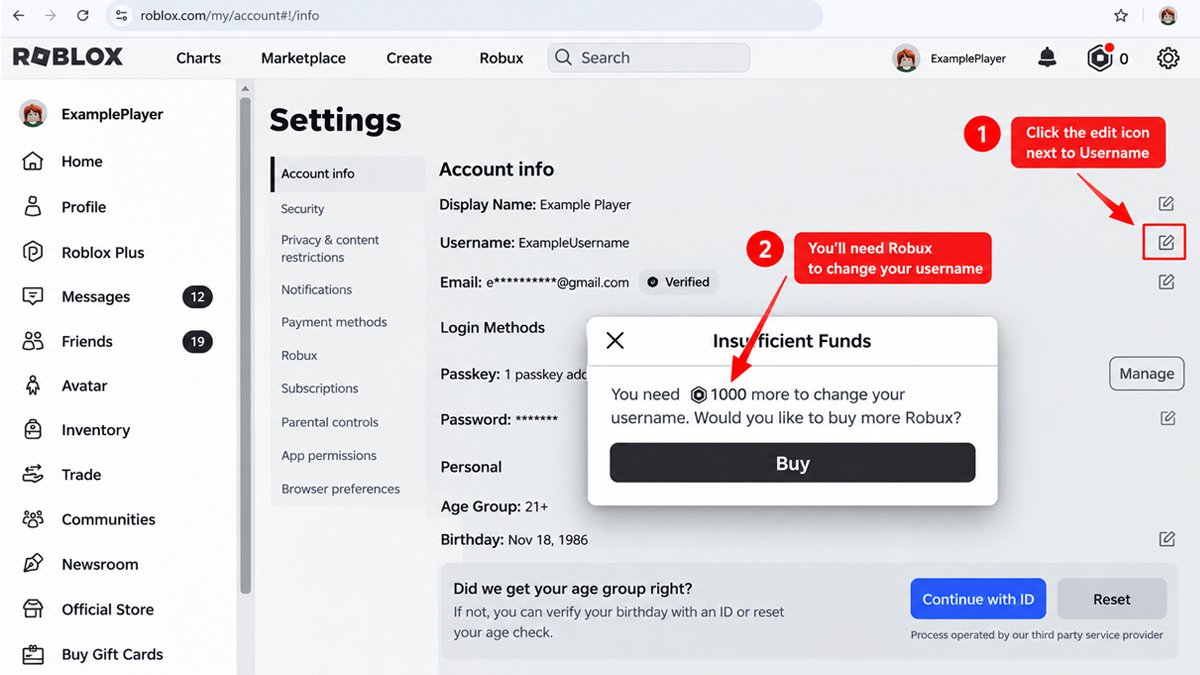
- Log in to your Roblox account: Open the Roblox account for which you want to change the username
- Open Settings: On the Roblox home screen, look for the gear icon (on the browser) or the three dots icon for More (on the mobile app). Tap that icon and select Settings.
- Open the Account Info tab: Navigate to Account Info (located at the top of the settings list.
- Select “Change Username”: Find the pencil-and-paper icon to the right of “Username.” Tap that icon to start changing your username. Note that this is different from the “Display Name,” which appears above the “Username” option.
- Enter the desired new username: Type your new username, and double-check to make sure there are no typos.
- Enter your Roblox password: Enter your current Roblox password to verify the username change.
- Select Buy: Complete the username change process by selecting the Buy button.
So, that’s how to change your Roblox username. If the username change is successful, you can use that username to log in without needing a different password. Therefore, changing your username requires Robux and a new name.
You should think carefully before changing your username, as your display name is much more flexible to change. Changing your Roblox username is fairly easy. However, you need to fully understand all the terms and conditions to ensure a smooth process.
How Much Does It Cost to Change Your Roblox Username?
Changing your Roblox username requires spending Robux. As Roblox updates, the cost for this may vary. The system will notify you when you attempt to change your username or access other features that require spending Robux.
So, how much does a Roblox username cost? Changing your username requires Robux. If you don’t want to spend Robux, you can only change your display name (once every 7 days).
What Happens to Your Old Roblox Username?
You might be wondering what happens after you change your username on Roblox. Even though you have a new username, your old one doesn’t just disappear from the system. Your Roblox old username can even be easily seen on some occasions.
Your previous usernames can be viewed through Settings, Profile, and People Search. Yes, your old username can be seen by other players when they search for your name. So, your username history remains even after you’ve changed it to a new one.
You can reuse your old username, though you’ll still have to spend Robux. The bottom line is, think carefully before choosing a username when you sign up or when changing it later on.
Can You Change Back to Your Old Roblox Username?
Roblox allows you to change your username back to one you’ve used before. You can follow a procedure similar to changing your username to a new one. Recovering an old Roblox username still requires following Roblox’s terms and conditions.
If your old username is already in use by another user, you cannot use that username. Changing back to an old Roblox username still requires Robux. So, think twice every time you’re about to tap the “Buy” button when changing your username.
Roblox Username Rules and Limitations
There are several important Roblox username rules to be aware of before changing your username. Usernames must be unique; they cannot match any other account on Roblox. You’ll be prompted to choose a different username if it’s already taken by another user.
There’s also no username swap feature on Roblox. You might want to use one of your other accounts to swap usernames; unfortunately, that’s not how Roblox works. The username change feature is only available in Account Info, where you can also change your Display Name.
Another rule you need to know regarding how to change your Roblox username is that there’s no discount for capitalization. That’s part of the username change process that requires you to spend Robux. So, think it through carefully before making your final decision.
If you only want to make a minor change, such as switching between uppercase and lowercase letters, it’s better not to change it at all. Another thing to note is the account creation date, changing your username doesn’t mean your account will be treated as newly created. The original account creation date will carry over to your new username.
Why Can’t I Change My Roblox Username?
You may have already tried the steps above on how to change your Roblox username and still can’t do it. There are a few common issues you need to be aware of so you can change your username smoothly.
Username Is Already Taken
As long as the username you want is still being used by another player, you won’t be able to use that username at all. You can modify the name so it can be applied while still remaining relevant.
I Don’t Have Enough Robux
Changing your username on Roblox requires a certain amount of Robux. If you don’t have enough Robux, you won’t be able to change your username. Do not use illegal methods to bypass this requirement to avoid putting your account at risk.
I Forgot My Password
One of the steps in changing your username on Roblox is entering your password. If you can’t enter the correct password, the process will be halted. Try to carefully recall your password, as it’s required to change your username.
The Username Doesn’t Meet Roblox Requirements
How to change your Roblox username? You need to follow Roblox’s guidelines. For example, if you can’t use the username you want, it might be because the name is already taken or because it violates Community Standards. Avoid names that are offensive, inappropriate, or sensitive.
Roblox Username vs. Display Name
Some players might be confused about the difference between a username and a display name. Both represent the name of an account, but there’s a difference in their primary functions. Check out the table below to fully understand the difference between a Roblox username vs display name:
Swipe left to see more →
| Aspect | Username | Display Name |
|---|---|---|
| Main Purpose | Unique account identifier | Name to be displayed to players |
| Can Be Changed | Yes | Yes |
| Uniqueness | Must be different from other players | Can be the same as other players |
| Change Cost | 1,000 Robux | Free |
| Change Limit | Each change requires 1,000 Robux | Once every 7 days |
Essentially, your username serves as your account’s unique identifier so other players can easily find you. Meanwhile, your display name is simply the name you want to show to other users. You might want to change the name on your profile, but sometimes it’s recommended to just change your display name.
Why? Changing your username requires spending Robux, whereas changing your display name is free, as long as you do it only once every 7 days. Determine whether you need to change your username or if changing just your display name is sufficient.
Username vs. User ID
A username is not the same as a Roblox User ID, even though they may look similar at first glance. A username serves as a unique account identifier, and you can change it. Meanwhile, a User ID is more of a numeric identifier for your account, the concept is different from a username.
When you change your username, your User ID does not change. The User ID is associated with your account and is a stable field related to account identification.
Things to Know Before Changing Your Roblox Username
Now that you know how to change your Roblox username, here are some things you need to know and keep in mind before changing it:
Make Sure You’ve Chosen the Right New Name
Don’t rush to change your username; make sure you’ve chosen the username you really want. Changing your username requires Robux, unlike your display name, which can only be changed once every 7 days. Also, make sure the name is safe for the Roblox community.
Get Robux
How to change username on Roblox? You’ll need to buy Robux first to change your username. Without enough Robux, the system can’t process the username change and will notify you if you have insufficient funds.
Usernames Must Be Unique
Usernames cannot be the same across players; if the name you want is already taken by another player, you cannot use it. This is different from a display name, which can be shared by multiple players.
Password Required
To change username on Roblox, you’ll need to enter your password. If you’ve forgotten your password, the username change cannot be processed. Your password is required to help secure your Roblox account.
Previous Username Is Visible
Your old Roblox username doesn’t just disappear. It can still be seen in several places, including your Profile and Settings. Other players can also see it through People Search. You can switch back to your old username, but you’ll need to spend Robux to do so.
No Username Swap Feature
Roblox does not offer a username swap feature. You cannot exchange usernames with other players.
Make Sure Your Username Complies with Roblox Rules
Choose a username that isn’t sensitive, offensive, or vulgar. Review the Roblox Community Standards to learn what kinds of names are not allowed for your username and display name.
Frequently Asked Questions
Can I change my Roblox username?
Yes, every player can change their username. You can do this through the Account Info section in the Settings menu.
How much does it cost to change a Roblox username?
You’ll need to buy at least 1,000 Robux to change your username on Roblox. Roblox may change this amount at any time, so be sure to check for updates.
Can I change back to my old Roblox username?
Yes. You can change your username back to one you’ve used before. However, you’ll still need to spend Robux.
Can I use a username that belongs to another Roblox account?
No. Usernames on Roblox are unique and can only be owned by one player. Choose a different username if the system detects that another user is already using that username.
Can I change my Roblox username without Robux?
To change your username on Roblox, you must spend Robux and enter your password. You can only change your display name for free.
Can other players see my old Roblox username?
Yes. They can see it when they discover you through People Search. Old usernames are also visible in your Profile and Settings.
Is a Roblox username the same as a display name?
The two differ in function, frequency of changes, cost of changes, and uniqueness. Usernames must be unique across players because they identify accounts, while changing a username requires Robux. Meanwhile, display names can be the same across players; they serve to show your name to other players and can be changed for free once every 7 days.
Can I swap usernames with another Roblox account?
No. You cannot swap usernames with another Roblox user or with any of your other accounts.