 Posted by
 Looking for the Hypixel IP? Many Minecraft players search for its address when they want to join the server but are unsure what to type.
The Hypixel server address lets you join the Hypixel Server. Hypixel’s official address is mc.hypixel.net ; use that address to start exploring the Hypixel world. This post explains the server address in more detail, how to join, requirements, and basic troubleshooting.
What Is the Hypixel IP?
The Hypixel IP is the address used to connect to the Hypixel server. So, what Hypixel server address can players use? The server address is mc.hypixel.net; it’s the primary, official hostname you can use.
This address automatically directs players to the server system without any extra settings. You might be confused by terms like IP address, server address, and hostname. These three are different, and it’s best to understand these basics before moving on to how to join the server.
An IP address is a sequence of numbers that identifies a device on a network. In contrast, a server address is the address used to connect to a server that provides data and supports client connections. Meanwhile, a hostname is a text-based label for a server or device on a network, making it easier for humans to understand without relying on the numbers in an IP address.
Avoid other server addresses; only use trusted Hypixel Minecraft server IP, as there are unreliable sources that share fake addresses. You can use this address via the “Add Server” option in a compatible Minecraft edition.
How to Join Hypixel
There aren’t too many steps to join a Hypixel server. Minecraft Java Edition provides an interface that makes it easy even for new players. So, how to join Hypixel? You can follow the step-by-step tutorial below:
For the latest joining instructions, check the official Hypixel Support guide.
Open a Compatible Edition of Minecraft
Launch Minecraft Java Edition, not Minecraft Bedrock Edition. Use a valid Minecraft account; you can purchase one through the official Minecraft website. Wait a few moments until the main page has fully loaded.
Select the Multiplayer Menu
From the main page, you can navigate to the Multiplayer option, the button below Singleplayer. If a warning appears, follow the on-screen instructions to continue.
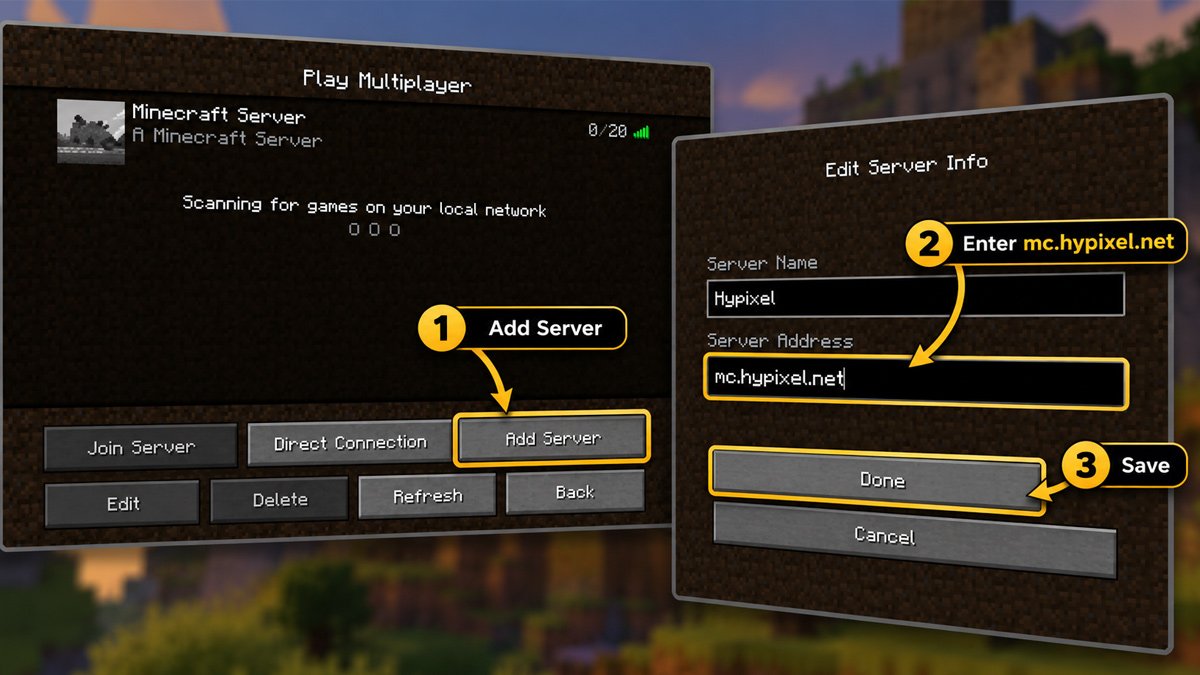
Select “Add Server”
In the Play Multiplayer menu, you’ll find options like Join Server, Direct Connection, Add Server, and others. If you’ve never added a server before, the list will be empty. If you’ve added one before, the list will appear, and you can select Join Server.
Select “Add Server” to save the connection so you can use it repeatedly without having to re-enter the address or IP.
Type mc.hypixel.net in the “Server Address” field
Here, you’ll need to enter the server address and server name. You can type any name you like, but to keep it simple, just name it “Hypixel.” In the server address field, type or copy and paste “mc.hypixel.net”, make sure there are no spaces.
Save Server
Before applying the server addition, double-check that you’ve entered the correct Hypixel IP address. Look at the bottom for the “Done” button; click it to save the server settings.
Select and Join the Server
After you’ve added the server, the Hypixel server will appear in the list. Select the Hypixel server and the “Join Server” button. You can also double-click to access the server more quickly from the list. Wait a few moments until you’re fully connected to the server and enter the main lobby.
What Minecraft Version Do You Need for Hypixel?
You cannot access the Hypixel IP without a compatible version of Minecraft. So, which version of Minecraft supports Hypixel servers? Use Minecraft Java Edition to access Hypixel; Bedrock Edition isn’t compatible.
Make sure to update your Minecraft client as well, since Hypixel may not work on outdated versions. Use a valid Minecraft account, you can purchase one first if you don’t already have one. Get the account only from the official Minecraft website to avoid phishing and other risks.
Also, make sure you meet the system requirements. At a minimum, you’ll need an AMD Ryzen 3 or Intel Core i5 processor, at least 1 GB of free disk space, 8 GB of RAM, and a stable internet connection. We recommend 16 GB of RAM for smoother gameplay.
Hypixel Server Address vs. IP Address
A server address and an IP address are very similar. So, which one should you use, the Hypixel IP or the server address? Using the official server address is recommended because you won’t have to go through the trouble of finding and entering a numeric IP address.
Typing an IP number is quite complicated and often leads to errors that prevent you from accessing the server. An IP address is a sequence of numbers used to identify a device on a network. Instead of memorizing a string of IP numbers, it’s better to remember or write down the Hypixel address.
This is where the hostname comes in to help players easily access the server. Use mc.hypixel.net as a hostname that’s easy to remember and type.
So, you no longer need to rely on numeric IP addresses. Use the official Hypixel server address, mc.hypixel.net, when joining the server.
How to Fix a Hypixel IP or Server Address That Isn’t Working
Are you experiencing an error screen or other issues when trying to access the Hypixel server IP? Players commonly run into several issues. However, you don’t need to worry, because you can resolve them.
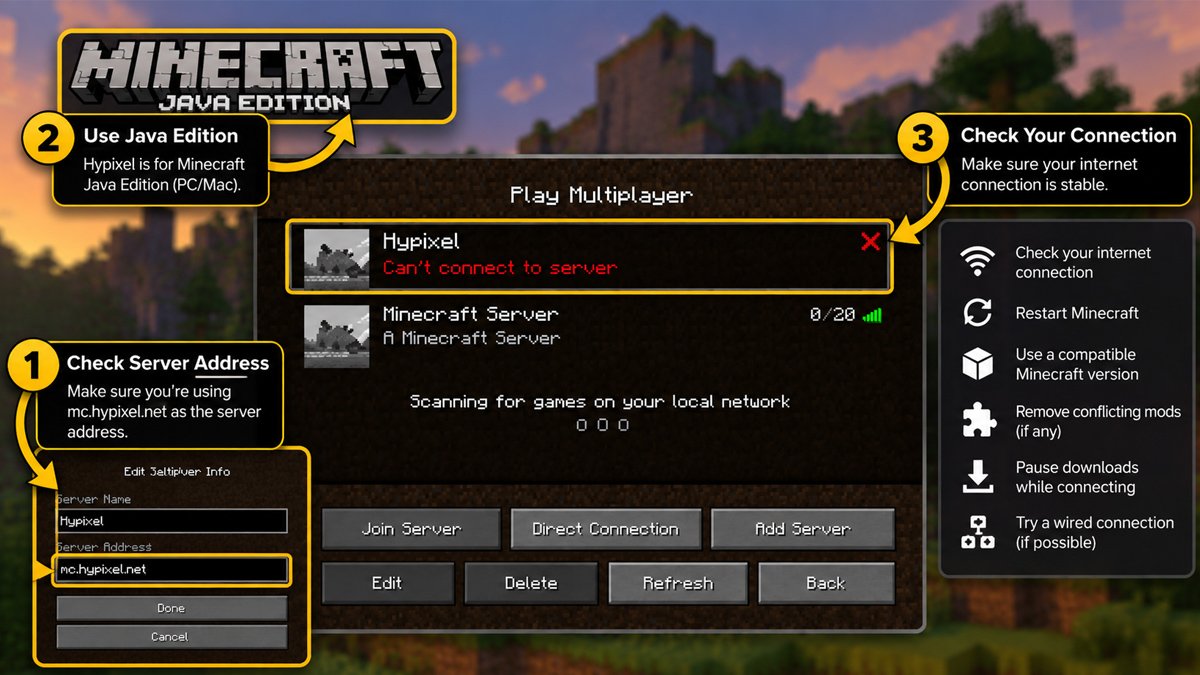
Check out the troubleshooting tips below to help you resolve access issues to the Hypixel server:
Unknown Host
One common mistake players make is entering the server address incorrectly. This can happen due to a typo or using an outdated address. To prevent this, double-check that the address you’re using is indeed mc.hypixel.net. Make sure there are absolutely no spaces in the address, as this can cause it to be unrecognized.
Minecraft Edition Not Supported
You might experience very long wait times to log in to the server, or you might be completely unable to access the Hypixel server. The problem might be that you’re using the wrong edition of Minecraft. You’ll need to switch from the Bedrock Edition to the Java Edition to use the Hypixel server.
Invalid Login/Session
Another issue could stem from a login or session problem with Minecraft. One solution is to restart the launcher. If that doesn’t work, log out of your account and log back in. Also, make sure your account meets the requirements to access the Hypixel Java server.
Connection Timed Out
You won’t be able to continue accessing the server if your internet connection is poor. Try checking your internet performance in other apps to see if it’s working properly. Use a stable and fast internet connection to avoid issues like this.
Try a different network, restart your router if you’re using Wi-Fi, and minimize internet usage on your device (e.g., stop downloading or uploading files).
Internal Maintenance
Access issues may also be due to maintenance by Minecraft or the server developers. Even though Hypixel is a large server, maintenance is still possible.
Maintenance is sometimes announced on the forum or through relevant social media accounts. Knowing this can help you plan when to play on Hypixel.
Can You Play Hypixel on the Bedrock Edition?
The Hypixel Server is available on specific editions of Minecraft. Can you use the Bedrock Edition? Unfortunately not; players cannot use their Minecraft Bedrock Edition to play on Hypixel.
If you try to load Hypixel in Bedrock Edition, it won’t fully launch. This is different from the Java Edition, which has settings that are fully compatible with the Hypixel system. Settings for the client, multiplayer, and server controls differ between the two editions.
Java offers the server controls needed to add servers such as Hypixel. Bedrock uses a different server system and is not compatible with the Hypixel Server.
So, do not use the Bedrock Edition or any other editions you might find through third-party sources. The official Minecraft Java Edition is the version you can rely on to play Hypixel.
Tips for Joining Hypixel
You should also be aware of some important tips when joining Hypixel. The tips below can help minimize issues when playing Hypixel:
Always Use the Official Server Address
Do not use servers from unofficial sources. Also, while it is possible to use numeric Hypixel IP address, it is not recommended. Use mc.hypixel.net as the official server address; it’s hassle-free to type. This is in contrast to the hassle of typing out a string of IP numbers, which carries a higher risk of error.
Ensure You’re Using the Correct Minecraft Edition
Avoid irrelevant Minecraft editions, such as unofficial client modifications or the Bedrock Edition. Use the official Java Edition for smoother access to Hypixel. Other Minecraft versions, such as the Console version and Pocket Edition, also cannot run Hypixel fully.
Make Sure You’re Logged In
You’ll need a valid account created through the official Minecraft website. Log in to that account to start creating or joining a Hypixel server.
Check Your Internet Connection
Before trying to join or add a server, it’s recommended that you check your ping first. Make sure you’re connected to a stable internet connection to avoid timeouts or slow page loading.
Don’t Use Unofficial Numeric IPs
Using Hypixel server addresses from unofficial sources may lead to connection problems or take you to a server you did not intend to join. It’s also easier to use the official hostname than to enter a string of numbers.
Check Official Information
If you’re experiencing issues with the Hypixel server, try checking to see if there are any official updates from the server developers or Minecraft. It’s important to do this first before making any major changes to your settings.
Frequently Asked Questions
What is the Hypixel IP?
The Hypixel IP is mc.hypixel.net, the official server address used to connect to the Hypixel Server.
What is the Hypixel server address?
The server address you can use to play Hypixel is mc.hypixel.net. Enter this address when you want to add a server in the Hypixel multiplayer menu.
How do you join Hypixel?
Open the official Minecraft launcher, making sure it’s the Java Edition, not another version. Navigate to the Multiplayer options, select the Add Server button, enter mc.hypixel.net in the server address field, and type a server name of your choice. You can join the Hypixel server once the server you just added appears in the list.
Can you play Hypixel on Bedrock?
Unfortunately, Bedrock has a different infrastructure than the Java Edition, which is compatible with Hypixel. If you want to play Hypixel, you’ll need to use Minecraft Java Edition.
What Minecraft version do you need for Hypixel?
You need Minecraft Java Edition to join Hypixel. Supported Minecraft versions can vary by game or mode, so check the latest Hypixel information if you are unsure which version to use.
Why isn’t the Hypixel IP working?
One common issue is an invalid Hypixel IP; this could be due to a typo or obtaining it from the wrong source. Other causes include maintenance, network issues, using a version other than the Java Edition, or an ineligible account.