 Posted by
 The Sea of Thieves map helps you find islands, seaposts, outposts, forts, and other important locations. Learn about the map table, how to view the map, how to determine your ship’s position, and more. Players also need to know map coordinates and how letters and numbers work to find key locations in Sea of Thieves.
Sea of Thieves Map
What exactly does the Sea of Thieves map do? Its function is to help you navigate to specific locations within Sea of Thieves. Players can use the map to view the entire world; it can be panned and zoomed. The Sea of Thieves full map displays island locations, markers, coordinates, and your ship’s current position.
Use this map to find destinations and track ship trails. The Sea of Thieves world map is useful for estimating positions or routes, making it easy to give instructions to your ship’s crew. The map provides coordinate and location information, use it to steer your ship to your destination.
How the Sea of Thieves Map Works
The Map Table is available on the player’s ship and can be used to open and view the map. Use it to view the full map and zoom in for more detail. So, where are the Sea of Thieves map locations?
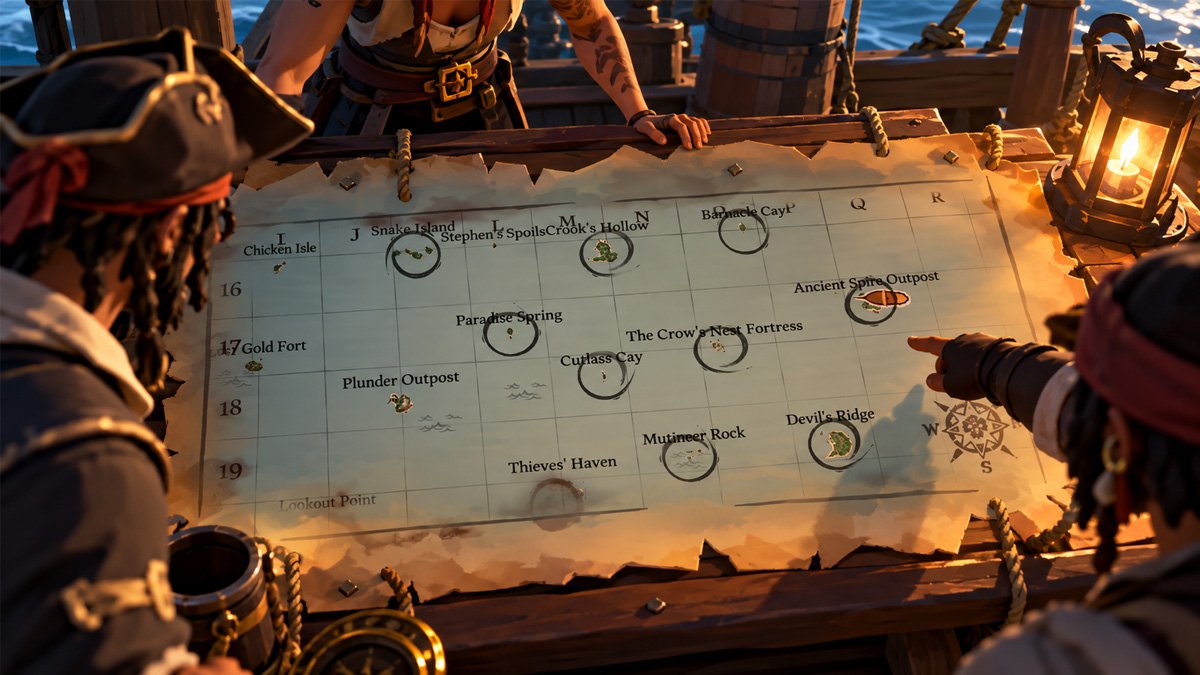
Go to the Map Table area and interact with it to access the map. The first player to interact with the Map Table gets control of map navigation and zoom. Other players can still view the map, but they cannot control navigation while another player is using it. You can use the ship’s marker to determine your current position and view your ship’s travel trail.
As a navigation tool, the Map Table makes it easy for players to determine their current position and compare it with their destination. Use the circle marker to mark a location or path on the map. This marker can help you plan a more efficient journey.
The first player to interact with the Map Table keeps control of map navigation until they leave it. Other players can handle the helm or other activities. Use the Map Table to check your position, adjust course changes, and plan other aspects of the journey.
Sea of Thieves Map Coordinates
Map coordinates in Sea of Thieves are coordinates that correspond to specific grid squares on the map. Each square has a combination of numbers and letters. Their purpose is to serve as a location reference; use them to steer the ship to your destination.
Players can use map coordinates if the destination name alone isn’t enough to guide the crew to the location. Using coordinates is also more precise, making the ship’s course clearer. If you find a guide, coordinates can make it even easier for you to follow that guide.
For example, suppose you find a guide that tells you to go to D-16. The navigator can open the Map Table and match D-16 with the grid on the map coordinates. Coordinates can help prevent players from making mistakes when arriving at a specific location, especially if the destination names are similar to one another or unclear.
Swipe left to see more →
| Island / Location | Region | Coordinate |
|---|---|---|
| Smuggler’s Bay | The Shores of Plenty | F-3 |
| Sanctuary Outpost | The Shores of Plenty | F-7 |
| Plunder Outpost | The Ancient Isles | J-18 |
| Thieves’ Haven | The Ancient Isles | L-20 / M-20 |
| Galleon’s Grave Outpost | The Wilds | R-8 |
| Morrow’s Peak Outpost | The Devil’s Roar | V-17 |
Sea of Thieves Islands and Locations
Players usually need a map to locate specific Sea of Thieves locations. Islands, Outposts, Seaposts, and Forts are what players typically look for using the Sea of Thieves map. Other locations may also be important, so players need to access the Map Table. Here’s an explanation of each of these locations in Sea of Thieves:
Islands
In Sea of Thieves, you can find islands in large regions. Each island serves a different purpose, such as The Wilds, The Ancient Isles, The Shores of Plenty, and other regions. The sizes of the islands in Sea of Thieves also vary.
So, how do you navigate to Sea of Thieves island locations? You can search for an island’s name and then cross-reference it with the Map Table, especially using the grid coordinates, for greater precision. You can also use an external interactive map to more easily identify the name of each island.
Familiarize yourself with the various regions in Sea of Thieves, this is essential geographical knowledge that makes it easier to pinpoint island locations. If you’re heading to a specific region, such as The Wilds, it’ll be faster and easier to steer your ship toward the island. Use coordinates for even greater precision and to avoid getting off course.
So, understand which region an island is in, navigate using coordinates, and find out the island’s name, these are practical steps to follow. You’ll be able to see the island’s name and get a clearer view as you approach it.
Outposts
Outposts are island towns where crews and ships can spawn when beginning a game or sometimes after a ship is sunk. Sea of Thieves outposts also serve as important hubs where you can prepare supplies, visit shops, and interact with Trading Companies.
Understand where the outposts are located to prepare for voyages, pick up Voyages, sell treasure, and manage other activities. You can find outpost locations using coordinates on the map. The names of the outposts will appear on the Map Table, such as Port Merrick or Sanctuary Outpost.
Seaposts
Seaposts are small trading locations found throughout Sea of Thieves. They can be useful for certain trading activities and services during a voyage. Use the Map Table or an external interactive map to identify their locations before setting sail.
Forts and Other Important Locations
Forts are places where you can earn rewards, primarily through combat activities. You can find skeleton forts guarded by living skeletons, for example, which provide specific supplies. There are also sea forts that offer quick combat opportunities for rewards.
You can also find uncharted islands that aren’t marked on regular maps, shipwrecks, siren treasuries, and other important locations.
Sea of Thieves Interactive Map
You can access the main navigation features from the Map Table. However, an external Sea of Thieves interactive map can be useful when you want to search for specific islands, locations, or points of interest before planning your voyage.
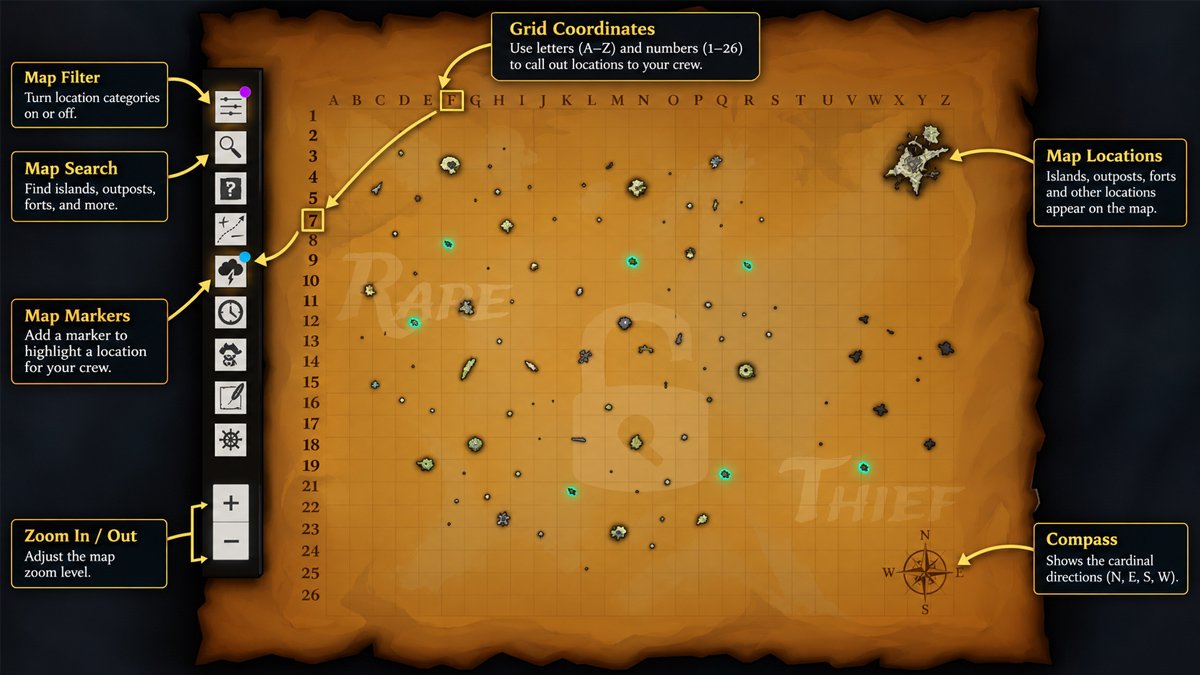
You can explore the Sea of Thieves map with names using the search bar, just type the name there, and it will display the specific location for you to use. Use the filtering options to more easily determine your destination, and use the marker feature to find points of interest.
So, the interactive map makes it easier to plan your journey before setting sail. Use the interactive map alongside your in-game Map Table for efficient navigation.
How to Find an Island on the Sea of Thieves Map
One of the main focuses of this game is sailing to specific islands. Before starting your journey, you must first find an island to visit. For beginner players, you can follow the practical steps below to find Sea of Thieves islands:
Open the Map Table
From your ship, go down to the deck, and you’ll find the Map Table. Use it by tapping the interaction button to start searching for a destination.
Search for Islands/Destinations
Decide which island you want to go to. Open your voyage or mission log to find out the correct island. You can scroll and zoom in on the map to find the island by its name. Directions to the island may vary depending on the mission.
Pay attention to your position and coordinates
On the Sea of Thieves map, you can see your ship’s current position by checking the ship icon. You can also compare your position with the destination island and use markers to help you remember positions or locations.
Determine the direction
Found the island? Use the Map Table to identify its position relative to your ship. Place a circle marker near the destination if needed, then use your compass to set the direction for your ship.
Start sailing to your destination
From the deck to the helm, start using the compass to steer your ship in line with the direction you set earlier.
Check the map again
During your voyage, the crew can periodically check the Map Table to make sure the ship is still on course and isn’t straying too far from the destination.
Tips for Using the Sea of Thieves Map
Beyond knowing how to find islands or other destinations on the Sea of Thieves map, there are also some essential tips. Check out the tips below for more effective navigation:
Learn the Grid System
It’s easier to read the map, especially to determine your position and locate coordinates, if you’re familiar with the grid system. The map uses a 26-square grid with alphanumeric coordinates, making it easier to identify specific locations.
The more familiar you are with the grid system, the faster you’ll be able to find the Sea of Thieves map coordinates. You’ll also avoid confusion when following instructions from guides.
Get to Know Popular Outposts
Find out which outposts you should visit frequently and memorize their locations. You won’t need to constantly open and close the map or go back and forth to the Map Table once you’ve memorized the Sea of Thieves outpost locations. Once you know the direction to a specific outpost, you can instantly change your route.
Communicate with Your Crew Using Coordinates
Get into the habit of using coordinates when telling your crew where to go. This gives clearer instructions than vague directions or just an island name. You can also specify the compass direction when useful.
Check the Surrounding Area
Before deciding on a route, check the surrounding area. Why? Checking the surroundings before setting sail can help you account for The Storm, The Devil’s Roar, the Reaper, and other threats.
Use the Interactive Map
If you have a specific location you want to find easily, use the interactive map. The interactive map can help you find a specific destination faster with its features.
Double-Check After Major Updates
Major updates from Rare, the developer, can change the system. Updates may alter details regarding islands, navigation, outposts, trading posts, or other elements. Location names may also change after an update; if you’re unaware of these changes, it could lead to confusion later on.
Frequently Asked Questions
What is the Sea of Thieves map?
This is the map accessible via the Map Table in Sea of Thieves. You can view islands, outposts, your ship’s position, map markers, and other important map information.
How do you open the map in Sea of Thieves?
Go to the Map Table area and press the interact button to open the map. The first player to interact with it gets control of map navigation and zoom, while other players can still view the map.
How do Sea of Thieves map coordinates work?
Map coordinates in Sea of Thieves use an alphanumeric grid system. The map is divided into 26 squares, with letters and numbers used together to identify locations, such as G-23 or I-4.
Is there an interactive Sea of Thieves map?
Yes, you can find interactive maps on community websites, which can make it easier to locate points of interest in Sea of Thieves. An interactive map is not part of the game itself; the in-game navigation chart is the Map Table.
How do you find islands in Sea of Thieves?
Interact with the Map Table and match the shape of the island or its name. You can search for them using the search bar if you’re using the interactive map.
Where can you find outposts on the Sea of Thieves map?
You can look for the named outposts on the Sea of Thieves map. Use the name search feature on an interactive map to find outposts more easily and accurately.