 Posted by
 Purchasing Roblox “Limited” or “Limited U” items differs from buying standard avatar items. Some Limited items can still be purchased directly from Roblox, while others are available through player resales after Roblox stops selling them. Therefore, it is important to know how to buy Limited items on Roblox and what to check before confirming a purchase.
On the item details page, Roblox displays the “Limited” or “Limited U” status and, if available, provides a list of resales and a price chart. These features help you understand your purchasing options before spending your Robux.
Roblox may change Marketplace features, pricing, and purchasing rules from time to time. Check the Roblox Help page for the latest information before making a purchase.
What Are Roblox Limited and Limited U Items?
Roblox Limited and Limited U items are collectible avatar items that can be bought and, when eligible, resold by players.
Limited
A Limited is an avatar item that is sold for a limited period. After Roblox stops selling it, the item becomes collectible and may be resold by players.
Limited U
A Limited U, short for Limited Unique, is released with a fixed number of copies. Each copy has a unique serial number.
Where Can You Buy Roblox Limited Items?
Where you buy a Limited depends on whether Roblox is still selling the item.
Situation 1: The Limited Is Still Being Sold by Roblox
If the item is still on sale, you can purchase it directly through its item details page. Check the displayed price, select Buy, review the confirmation screen, and confirm the purchase if everything is correct.
Situation 2: The Limited Is No Longer Sold by Roblox
When Roblox is no longer selling a Limited or Limited U, players may resell their copies to other players. On the item’s details page, you can see the current lowest price being asked by a player, along with a Resellers section showing available sellers from the lowest price to the highest.
This means the price displayed for Limited items no longer sold officially is not the original retail price, but rather the lowest price currently requested by a player.
How to Find Limited Items on Roblox
The easiest way to find Roblox Limited items is through the Marketplace. You can search for an item by its name or keyword, browse available categories, and open the item details page for more information.
For more tips on searching and filtering items, see our guide on how to use the Roblox Marketplace.
A practical way to search is:
- Open the Marketplace.
- Search for the item’s name or a relevant keyword.
- Browse the available results or categories.
- Open the item you want to investigate.
- Check its item details page for the Limited or Limited U tag.
Rather than relying on one specific menu path, focus on reaching the Marketplace and opening the item’s details page. That page contains the information you need to determine whether the item is a Limited and whether it is currently available to buy.
How to Tell If a Roblox Item Is Limited
Before buying an item, check its details page instead of assuming that a collectible-looking item is a Limited.
- Limited tag , confirms that the item is a Limited.
- Limited U tag , confirms that the item is a Limited U.
- Item details page , provides the item’s current purchase information.
- Current price , shows the price relevant to the available purchase option.
- Buy availability , tells you whether the item can currently be purchased.
- Resellers section , may appear when a Limited is being resold by players.
- Price Chart , provides historical average-price information over selected periods.
Roblox states that if the button is faded or unavailable, the item is not currently for sale. For an off-sale Limited, the page can instead show the current lowest asking price from players and available reseller listings.
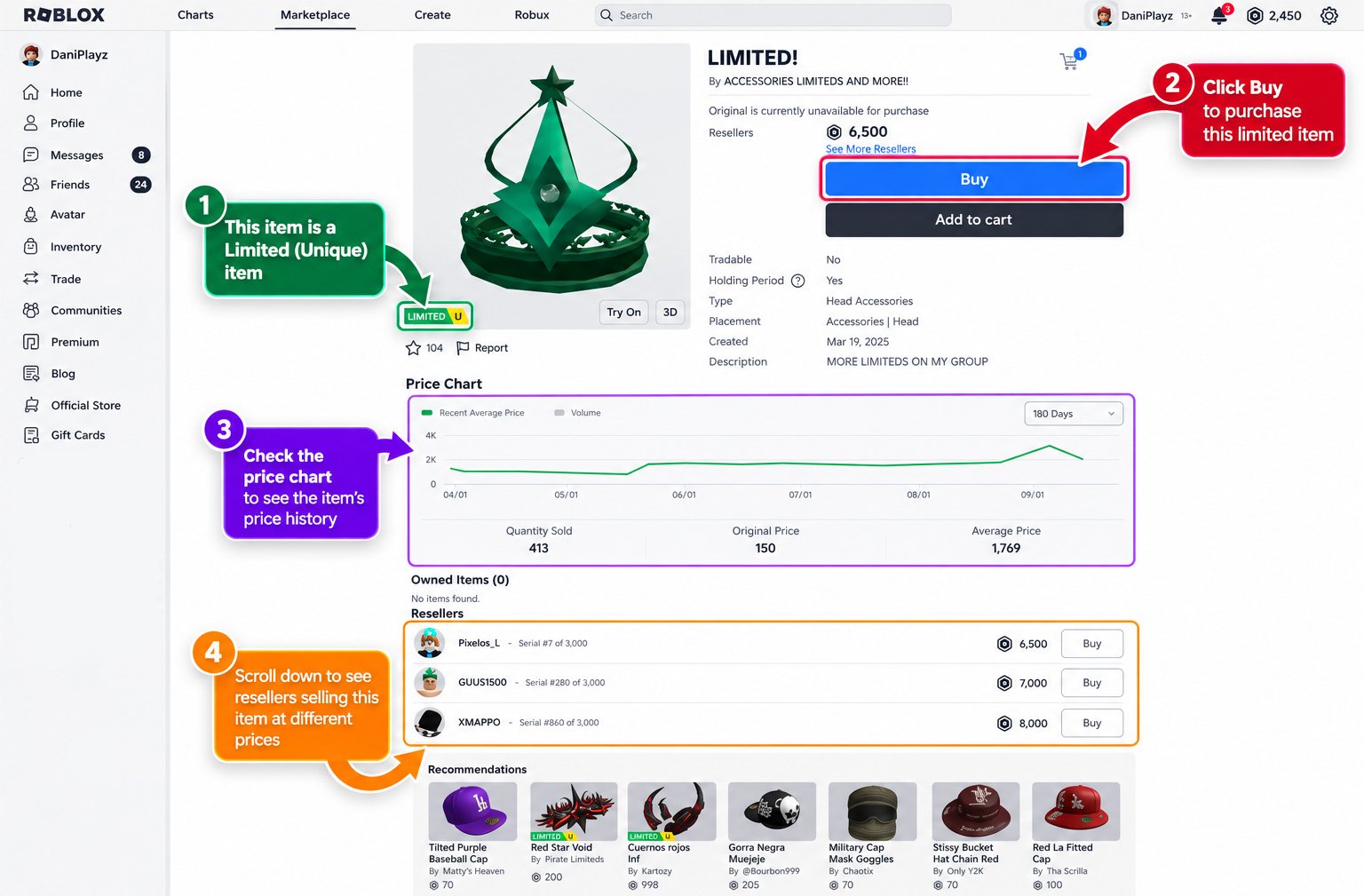
How to Buy a Roblox Limited Item
After finding the desired Limited item, carefully examine it before confirming the transaction. Follow these steps:
1. Open the item’s details page
Select the item from the Roblox Marketplace and make sure it is the exact Limited you intended to purchase.
2. Check the Limited or Limited U tag
Look below the item’s image to confirm that Roblox identifies it as Limited or Limited U.
3. Check the current price
Look at the price displayed on the item page. For an off-sale Limited, this can be the lowest price currently requested by a player.
4. Review the item details
Check the item name, type, description, image, and Limited/Limited U status. This helps prevent buying a similar but different item.
5. Review the price information
If the item is being resold, check the current lowest asking price, Resellers, and Price Chart. Roblox lists available resellers from the lowest price upward and provides historical average-price data.
6. Select Buy
Use the purchase option displayed on the item’s current details page. If the button is unavailable or faded, the item is not currently for sale.
7. Review the confirmation screen
Before proceeding, verify the item, price, and amount of Robux involved.
8. Confirm the purchase
Only confirm when everything is correct. Roblox states that purchases are final, so a completed purchase cannot be refunded.
How to Buy a Limited From Another Player
When a Limited is no longer sold directly by Roblox, you can purchase an available copy from another player through the item’s details page. The process is still a Robux purchase, but you should review the reseller information before confirming it.
- Open the Limited’s details page and confirm that you have the correct item.
- Check that Roblox is no longer selling it directly.
- Review the current lowest price. For an off-sale Limited, Roblox displays the lowest price a player is currently asking.
- Open the Resellers section to see available sellers and their prices.
- Compare the available listings and choose the listing that matches your budget and the price you are willing to pay.
- Select the available Buy option for the listing you want.
- Review the confirmation screen, paying close attention to the item and Robux amount.
- Confirm the purchase only after everything matches your expectations. Roblox states that purchases are final and cannot be refunded after confirmation.
Keep in mind that a reseller listing is not a trade offer. A reseller listing allows you to buy another player’s Limited using Robux. A trade, by contrast, involves directly exchanging items with another player.
How to Choose a Roblox Limited Listing
Choosing a reseller listing is more than simply picking the first price you see. Before buying, compare the available options and verify the item carefully.
- Lowest price: Check the cheapest listing, but make sure it is for the exact item you want.
- Current prices: Compare several available listings to understand the prices currently being requested by sellers.
- Price Chart: Use Roblox’s Price Chart to review historical average prices over 30, 90, or 180 days. This provides context, not a prediction of future prices.
- Item identity: Confirm the name, Limited or Limited U status, item type, thumbnail, and description.
- Your budget: Only consider listings that fit the amount of Robux you are prepared to spend.
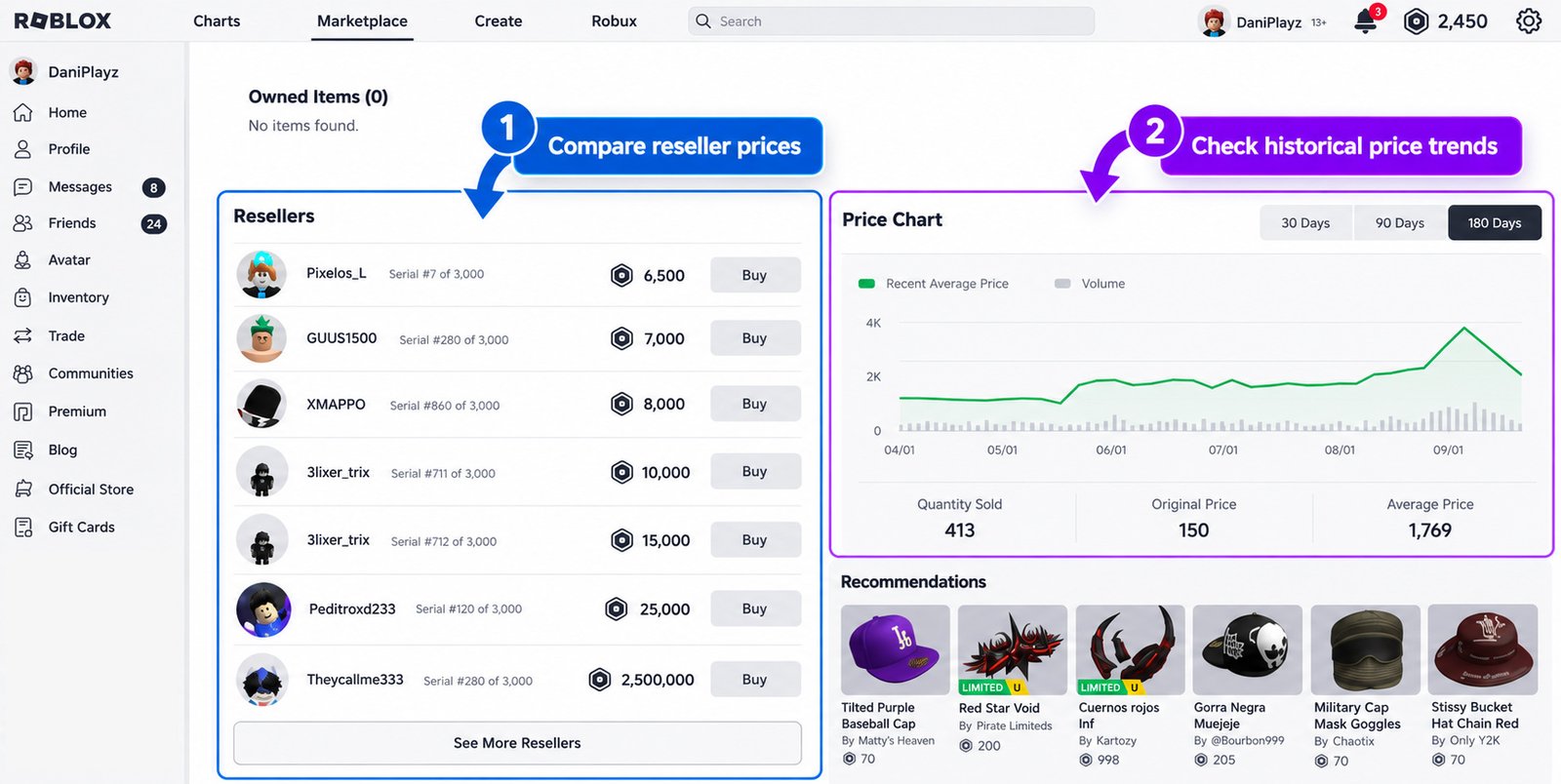
A higher or lower historical price does not guarantee what the item will cost later, so use the chart as historical information rather than a reason to buy.
How to Read the Roblox Limited Price Chart
Instead of focusing only on today’s asking price, you can use the chart to see historical pricing patterns. Roblox currently provides three time ranges:
- 30 days , shows more recent price history.
- 90 days , provides a broader view of recent pricing.
- 180 days , shows the longest available historical period.
What Should You Check Before Buying a Roblox Limited?
Before clicking Buy, take a moment to check the details of the transaction. Use this quick checklist:
- Is this the correct item?
- Is it actually Limited or Limited U?
- Is the price within your budget?
- Is the item currently available?
- Are you viewing the correct reseller listing?
- Did you check the current price?
- Did you review the confirmation screen?
- Do you understand that the purchase is final?
Never rush a Limited purchase just because the price or availability may change.
Why Is the Roblox Limited Buy Button Unavailable?
If the Buy button is unavailable or appears greyed out, it does not necessarily mean something is wrong with your account.
The Item Is Not Currently for Sale
Roblox Support explains that an unavailable or faded Buy button can indicate that the item is not currently for sale.
The Item Is No Longer Available
If a Limited is still being sold by Roblox, its availability can change or the available supply can run out.
Insufficient Robux
Check your Robux balance and compare it with the displayed price. You need enough Robux to complete the purchase.
It Is Not the Limited You Intended to Buy
Go back through the item details. Confirm the name, image, item type, and Limited or Limited U tag before assuming the purchase option is missing.
Marketplace or UI Issue
If everything appears correct but the purchase option is not working as expected, check Roblox Support for current information.
Is Buying Roblox Limited Items Safe?
For a safer purchase:
- Use the official Roblox Marketplace to find and buy Limited items.
- Never share your Roblox password with another player or seller.
- Do not make payments outside Roblox for a Limited purchase.
- Be cautious of websites advertising cheap or free Limiteds.
- Never enter your Roblox login credentials on a third-party site promising discounted or free Limited items.
- Check the item details before purchasing, including the name, Limited or Limited U status, and price.
If a deal requires you to send Robux, money, or account information outside Roblox, stop and review the offer carefully.
Can You Get a Refund for a Roblox Limited?
Roblox Limited purchases should be treated as final. Roblox Support states that Marketplace purchases are generally not refundable after they have been completed, so you should not assume that Robux can be returned if you change your mind or accidentally buy the wrong item.
Check before confirming the purchase. Once the transaction is confirmed, you should not expect a refund from Roblox.
Buying vs Trading vs Reselling Roblox Limiteds
Understanding the difference can help you follow the right process when you want to buy Roblox Limited items.
Swipe left to see more →
| Activity | What It Means | Main Focus |
|---|---|---|
| Buying | Paying Robux to get an item | The buyer chooses an item or listing |
| Trading | Exchanging items with another player | Two players complete a trade |
| Reselling | Selling an item you already own | The seller sets the asking price |
Trading and reselling are separate activities with their own requirements and processes. If you want to learn more about trading, see our guide on how to trade items on Roblox.
If you want to sell a Limited you already own, see our guide on how to sell items on Roblox.
What Happens After You Buy a Limited?
Once your Roblox Limited purchase is completed, the item becomes part of your Roblox inventory and account. You can view the item through Roblox and check its details whenever you need to confirm your ownership.
Depending on the item and Roblox’s current rules, an eligible Limited or Limited U may also have additional functions, such as trading or reselling. These activities are separate from buying and may have their own requirements and restrictions.
Frequently Asked Questions
How do you buy Limited items on Roblox?
Find the Limited, open its details page, check the price and listing, then select Buy and confirm the purchase.
Can you buy Roblox Limited items from other players?
Yes. Once a Limited is no longer sold by Roblox, it may be available through reseller listings on its details page.
How do you know if an item is Limited?
Look for the Limited or Limited U tag under the item image.
What does the lowest price mean on a Roblox Limited?
It is the lowest price currently requested by a player for an off-sale Limited.
Are Roblox Limited purchases refundable?
Roblox states that purchases are final and generally cannot be refunded after confirmation.
Can you trade a Limited after buying it?
Some eligible Limited items can be traded. Trading is a separate activity with its own requirements.